




lazy_names helps programmer to type faster very-long class names constants by defining them on a shorter version. If you are lazy like me typing many times a day in console long constants then this gem will ease your development process.
Consider this example from pry terminal session.
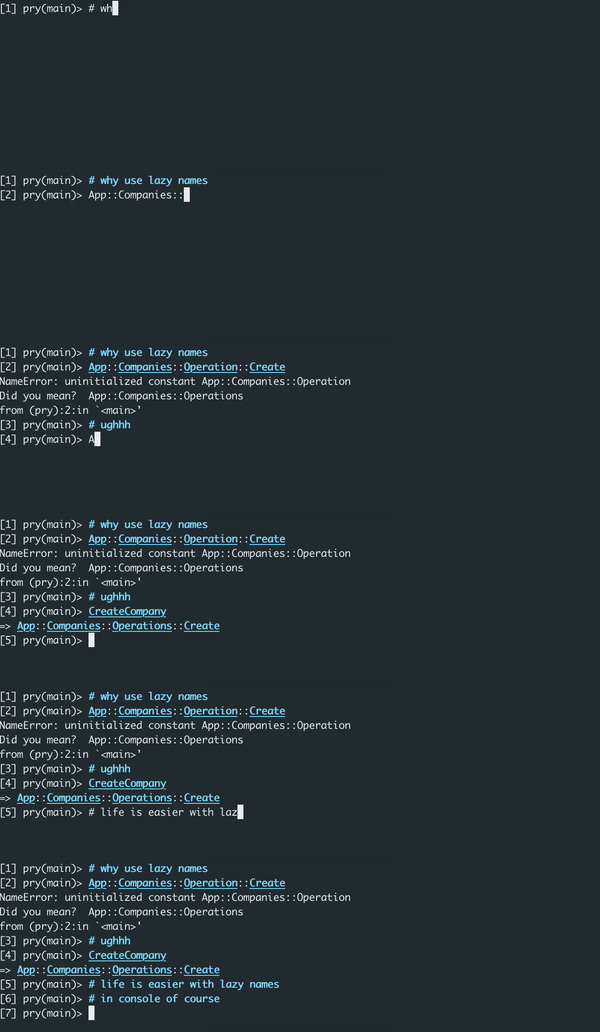
The idea is to reduce typing of long namespaced constants to shorter versions. It's very useful when you have a lot of nested namespaces and you need to access them frequently. This gem will take your responsibility to redefine constants to shorter versions and making constant/classes validations.
LazyNames v2.0 uses plain Ruby instead of YAML because:
- ✅ Intuitive: Same syntax you'd write in
.irbrc/.pryrc - ✅ IDE Support: Syntax highlighting and autocomplete work out of the box
- ✅ Validation: Constants are validated at load time
- ✅ Simpler: No YAML parsing, no extra abstraction
- ✅ Ruby-native: Write Ruby to configure Ruby
- Add this line to your application's Gemfile:
group :development do
  gem 'lazy_names'
end- Setup your console to automatically load lazy names
- If you are using pry, add this line to
~/.pryrcor per projectmyproject/.pryrc
if defined?(LazyNames)
  Pry.config.hooks.add_hook(:when_started, :lazy_names) do
    LazyNames.load_definitions!
  end
end- If you are using irb, add this line to
~/.irbrcor per projectmyproject/.irbrc
if defined?(LazyNames)
  LazyNames.load_definitions!
end- And then execute:
bundle- Create your own lazy_names config where you define constants
touch ~/.lazy_names.rb
# or for project-specific config
touch .lazy_names.rb- Login into your rails or non-rails console
$ bundle exec rails c # or bin/console
# your shorter version of constants are available now, enjoy!Create a .lazy_names.rb file in your project root or home directory:
# .lazy_names.rb
MUCC = Models::Users::CreditCard
SPP = Services::PaymentProcessor
CAVUC = Controllers::API::V1::UsersControllerLazyNames looks for configuration in this order:
./.lazy_names.rb(project-specific) — recommended~/.lazy_names.rb(global fallback)
This is the preferred approach. Create .lazy_names.rb in your project root:
# myproject/.lazy_names.rb
MUCC = Models::Users::CreditCard
SPP = Services::PaymentProcessor
Why project-specific files are better:
- Version controlled with your project (or gitignored for personal shortcuts)
- Explicit about what's loaded — no surprises
- Each project has exactly the shortcuts it needs
- No conflicts between projects
Don't forget to add it to .gitignore if you don't want to share:
echo '.lazy_names.rb' >> .gitignoreFor shortcuts that work across multiple projects, create ~/.lazy_names.rb in your home directory.
Important: Use if defined?() guards since constants vary between projects:
# ~/.lazy_names.rb
# Generic Rails shortcuts (usually available)
AR = ActiveRecord if defined?(ActiveRecord)
AM = ActionMailer if defined?(ActionMailer)

# Only defined if these exist in the current project
MU = Models::User if defined?(Models::User)
Note: v2.0 intentionally removed namespace/project scoping that existed in v1.x YAML configs. The if defined?() pattern is simpler and achieves the same result without magic.
LazyNames validates each line:
- ✅ Must be a constant assignment:
SHORT = Full::Constant::Path - ✅ Constant must exist in your application
⚠️ Invalid lines are skipped with a warning
# Comments are allowed
MUCC = Models::Users::CreditCard

# Blank lines are fine

SPP = Services::PaymentProcessor

# Underscores and numbers in short names
API_V1 = API::V1
CACHE2 = Cache::RedisCacheLazyNames v2.0 removes YAML support in favor of plain Ruby configuration.
Upgrading from v1.x? See the complete Migration Guide for:
- Automated conversion script
- Step-by-step instructions
- Troubleshooting tips
- New features in v2.0
After checking out the repo, run bin/setup to install dependencies. Then, run rake spec to run the tests. You can also run bin/console for an interactive prompt that will allow you to experiment.
After you make changes ensure to run rake rubocop to check if your code meets linter standards.
To install this gem onto your local machine, run bundle exec rake install.
Bug reports and pull requests are welcome on GitHub at https://github.com/zhisme/lazy_names. Ensure the CI build is green by validating tests are passing and coverage is not decreased.
The gem is available as open source under the terms of the MIT License.