
A simple flat button custom widget for wxWidgets. Tested on wxWidgets 2.9.*
A modern simplistic flat button which may contain two rows of text of different sizes.
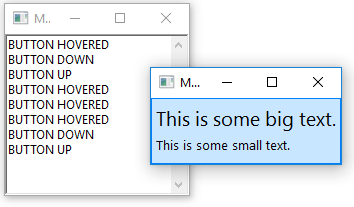
The prototype of the constructor is as follows:
wxFlatButton(wxWindow* parent, const long id, wxString SmallText, wxString BigText = "", wxFont f = *wxNORMAL_FONT, int smallSize = 10, int bigSize = 15, wxPoint position = wxDefaultPosition, wxSize size = wxDefaultSize);
The widget sends the following wxCommandEvents:
EVT_FLATBUTTON_DOWN, when the user presses the buttonEVT_FLATBUTTON_UP, when the user releases the buttonEVT_FLATBUTTON_HOVER, when the user hovers the mouse pointer over the buttonEVT_FLATBUTTON_LEFT, when the mouse pointer is no longer over the button
wxColour GetBorderColour()wxColour GetNormalColour()wxColour GetHoveredColour()wxColour GetPressedColour()wxString GetSmallText()wxString GetBigText()
void SetSmallText(wxString)void SetBigText(wxString)void SetBorderColour(wxColour)void SetNormalColour(wxColour)void SetHoveredColour(wxColour)void SetPressedColour(wxColour)
I hereby release this to the public domain. I don't mind if you credit me, though.