


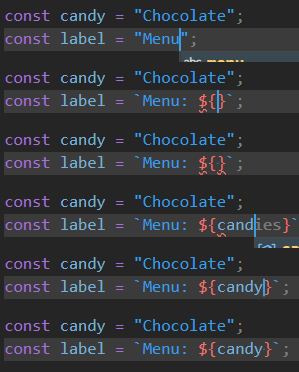
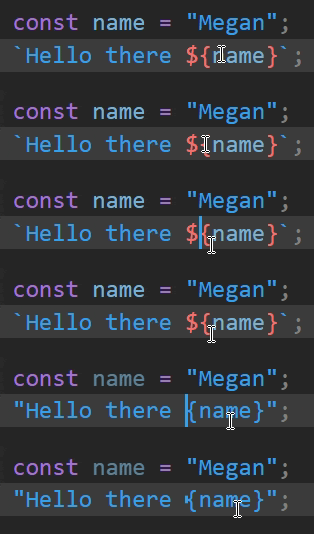
Template String Converter is a powerful yet lightweight VS Code extension that streamlines your JavaScript and TypeScript development. It automatically converts regular strings (single or double quotes) into template strings (backticks) the moment you start typing a dynamic expression—${.
No more manual quote swapping while building dynamic strings!
- Automated Conversion: Instantly transforms
'...'or"..."to`...`when you type${. - Intelligent Context: Works within JSX attributes, standard strings, and even nested templates.
- Auto-Cleanup: Optionally reverts backticks to regular quotes if you delete the
${sequence. - Language Support: Out-the-box support for JavaScript, TypeScript, JSX, TSX, and Svelte.
- Highly Configurable: Control precisely which quotes to convert and in which languages.
- Open Visual Studio Code.
- Go to the Extensions view (
Ctrl+Shift+XorCmd+Shift+X). - Search for
Template String Converter. - Click Install.
Before typing ${:
const greeting = "Hello, world";While typing ${name}:
const greeting = `Hello, ${name}`; // Quotes automatically changed to backticks!Before typing ${:
<div className="container"></div>While typing ${active ? 'active' : ''}:
<div className={`container ${active ? 'active' : ''}`}></div>Tip
Enable addBracketsToProps for JSX to automatically wrap your template strings in {} when working with props.
You can customize the extension behavior in your VS Code settings (settings.json):
| Setting | Type | Default | Description |
|---|---|---|---|
template-string-converter.enabled |
boolean |
true |
Enable/disable the extension entirely. |
template-string-converter.quoteType |
string |
"both" |
Which quotes to convert: "single", "double", or "both". |
template-string-converter.autoRemoveTemplateString |
boolean |
false |
Reverts backticks to quotes if ${ is removed. |
template-string-converter.addBracketsToProps |
boolean |
false |
Automatically adds {} around template strings in JSX props. |
template-string-converter.convertOutermostQuotes |
boolean |
false |
For nested strings, converts the outermost quotes to backticks. |
template-string-converter.convertWithinTemplateString |
boolean |
true |
Enables conversion inside already existing template strings. |
template-string-converter.validLanguages |
array |
[...] |
Languages where the extension is active. |

Contributions are welcome! If you'd like to help improve Template String Converter:
- Clone the repository:
git clone https://github.com/meganrogge/template-string-converter.git
- Install dependencies:
npm install
- Launch the extension:
Press
F5in VS Code to open a "Extension Development Host" window with your changes active. - Submit a PR:
Ensure your code passes the linter with
npm run lint.
- The extension requires the
${characters to be typed sequentially inside an existing string. - Complex nested string scenarios may require specific setting adjustments (like
convertOutermostQuotes).
If you find a bug, please file an issue.
This project is licensed under the MIT License. See the LICENSE file for details.
Developed with ❤️ by Megan Rogge.