


🔍 A beautiful, lightweight debugging dashboard for ASP.NET Core applications
Transform your debugging experience with real-time insights into HTTP requests, database queries, logs, and exceptions - all in a modern, responsive interface inspired by Laravel Telescope.
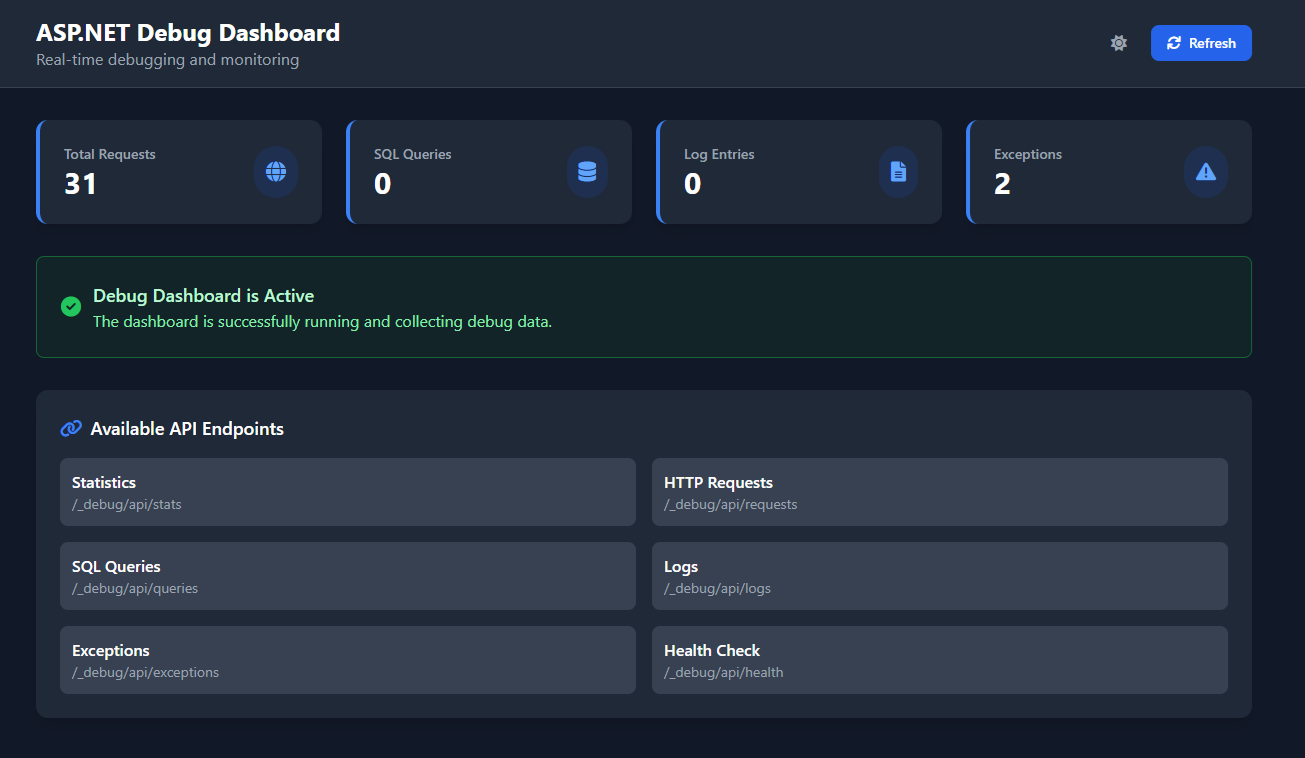
- Real-time request tracking with method, path, and status codes
- Request/response body capture with configurable limits
- Performance metrics and slow request detection
- Client information (IP address, user agent)
- Entity Framework Core integration with automatic query interception
- SQL query text with parameters and execution time
- Slow query detection with performance insights
- Success/failure tracking with error details
- Global exception handling with full stack traces
- Exception categorization and frequency analysis
- Request context and route information
- Error trend monitoring
- Structured logging with custom properties
- Multiple log levels (Info, Warning, Error, Success)
- Searchable entries with powerful filtering
- Performance logging and metrics
- 🌙 Dark/Light Mode - Beautiful themes with persistent preferences
- 📱 Responsive Design - Perfect on desktop, tablet, and mobile
- ⚡ Real-time Updates - Live data refresh
- 🔍 Advanced Search - Find anything across all data types
- 📊 Performance Charts - Visual insights and trends
- 📤 Export Data - Download data for analysis
dotnet add package AspNetDebugDashboardusing AspNetDebugDashboard.Extensions;
var builder = WebApplication.CreateBuilder(args);
// Add Debug Dashboard
builder.Services.AddDebugDashboard();
// Add Entity Framework with Debug Dashboard integration
builder.Services.AddDbContext<YourDbContext>(options =>
{
options.UseSqlServer(connectionString);
options.AddDebugDashboardInterceptor();
});
var app = builder.Build();
// Enable Debug Dashboard (development only by default)
app.UseDebugDashboard();
app.Run();Navigate to https://localhost:5001/_debug to view your dashboard! 🎉
builder.Services.AddDebugDashboard(options =>
{
    // Automatically enabled in Development, disabled in Production
    options.IsEnabled = builder.Environment.IsDevelopment();

    // Request/Response logging
    options.LogRequestBodies = true;
    options.LogResponseBodies = true;
    options.MaxBodySize = 1024 * 1024; // 1MB

    // SQL query monitoring
    options.LogSqlQueries = true;
    options.SlowQueryThresholdMs = 1000;

    // Performance settings
    options.SlowRequestThresholdMs = 2000;
    options.MaxEntries = 10000;

    // Security & Privacy
    options.ExcludedPaths = new[] { "/health", "/metrics" };
    options.ExcludedHeaders = new[] { "Authorization", "Cookie" };
});{
"DebugDashboard": {
"Enabled": false,
"LogRequestBodies": false,
"LogResponseBodies": false,
"MaxEntries": 1000,
"RetentionPeriod": "06:00:00"
}
}public class OrderService
{
private readonly IDebugLogger _debugLogger;
public OrderService(IDebugLogger debugLogger)
{
_debugLogger = debugLogger;
}
public async Task<Order> CreateOrderAsync(CreateOrderRequest request)
{
_debugLogger.LogInfo("Order creation started", new {
CustomerId = request.CustomerId,
ItemCount = request.Items.Count
});
try
{
var order = await ProcessOrderAsync(request);
_debugLogger.LogSuccess("Order created successfully", new {
OrderId = order.Id,
Total = order.Total
});
return order;
}
catch (Exception ex)
{
_debugLogger.LogError($"Order creation failed: {ex.Message}", new {
CustomerId = request.CustomerId,
Error = ex.GetType().Name
});
throw;
}
}
}public class PaymentProcessor
{
public async Task ProcessPaymentAsync(Payment payment)
{
DebugLogger.Log("Payment processing started", "info", new {
PaymentId = payment.Id,
Amount = payment.Amount
});
// Your payment logic here
DebugLogger.Log("Payment processed successfully", "success");
}
}- Development-only by default - Automatically disabled in production
- Sensitive data exclusion - Filters headers like Authorization, Cookie
- Path-based exclusions - Skip monitoring for specific endpoints
- Size limits - Prevent large payloads from impacting performance
- Data sanitization - Clean and validate all captured information
options.ExcludedHeaders = new[] {
    "Authorization", "Cookie", "X-API-Key", "X-Auth-Token"
};
options.ExcludedPaths = new[] {
    "/admin", "/api/auth", "/health"
};
options.LogRequestBodies = false;  // Disable for sensitive data
options.LogResponseBodies = false; // Disable for sensitive data- < 5ms overhead per request on average
- Async processing for non-blocking operation
- Configurable data collection to control performance impact
- Background cleanup to prevent storage bloat
- Memory efficient with automatic resource management
- Getting Started - Detailed setup guide
- Configuration - Complete configuration reference
- API Documentation - REST API endpoints
- Security Guide - Security best practices
- Troubleshooting - Common issues and solutions
We welcome contributions! Please see our Contributing Guide for details.
- .NET 7.0 or 8.0
- ASP.NET Core 7.0+
- Entity Framework Core 7.0+ (optional, for SQL query monitoring)
- Zero-configuration setup with intelligent defaults
- Beautiful, intuitive interface
- Works out of the box in development environments
- Real-time monitoring and updates
- Comprehensive data capture and analysis
- Advanced search and filtering capabilities
- Security-first design with privacy controls
- Performance optimized with minimal overhead
- Comprehensive test coverage
- Built with latest ASP.NET Core and React
- Responsive design with dark/light themes
- Real-time capabilities with SignalR
This project is licensed under the MIT License - see the LICENSE file for details.
- Inspired by Laravel Telescope
- Built with ❤️ for the ASP.NET Core community
- Issues: GitHub Issues
- Discussions: GitHub Discussions
- Documentation: GitHub Wiki
⭐ Star this repository if you find it helpful!
Made with ❤️ for .NET developers worldwide