Domain: Industrial Automation
Here we converted a monilithic web based HMI application to microservice based application and orchestrate them via kubernetes.
Here this application contain 3 machine HMI Servers and 1 dashboard so in total 4 applications within a single page VUE application.
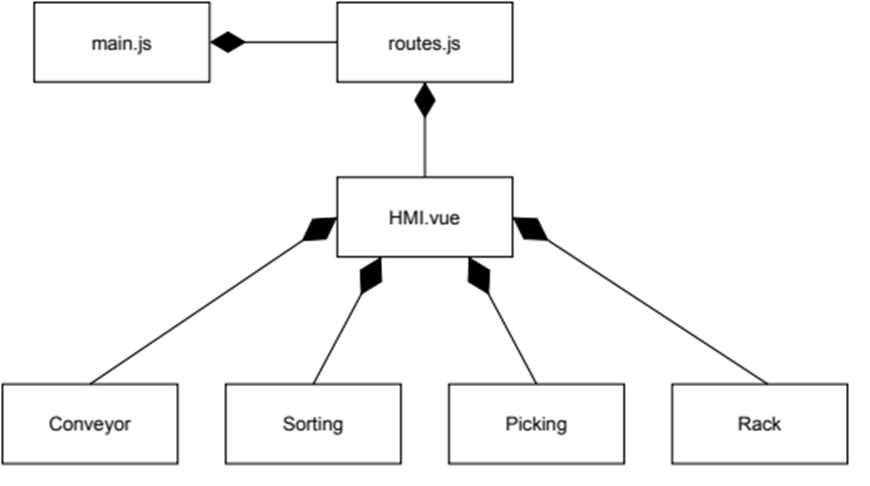
This is the frontend application for the web based HMI. It provides the operating displays to monitor and supervise the shopfloor components. This web based HMI is developed in a monolithic fashion, which means all components that make up this web based HMI are integrated through a single main.js file. Every shopfloor component is encapsulated by a single web-component. The web based HMI is developed with Vuejs framework.
This is the backend server for the monolithic web application. It works as an HMI server. It connects the distributed OPC UA servers at the shopfloor to the Frontend application. This server has in integrated OPC UA client that connects to OPC UA server.
-
Here we want to create a microservice for each of the HMI Server and one seperate for Dashboard --> 4 Microservices HMI Web Server -->
sdmhmi/conveyor,sdmhmi/picking,sdmhmi/sorting
Dashboard -->sdmhmi/spa -
We are using minikube at local machine to create k8 cluster
-
Created a docker file
- Path
Cloud-Computing-01/micro services HMI/root-html-file/Dockerfile
- Path
-
With the docker files, we created 4 different docker image
sdmhmi/conveyor,sdmhmi/picking,sdmhmi/sorting,sdmhmi/spa
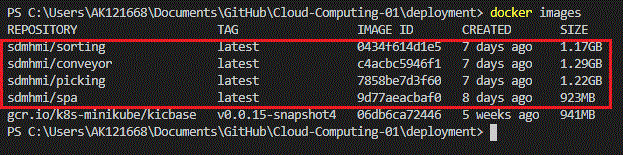
- We created a
cc-nsnamespace with thecreate_ns.yamlfile
apiVersion: v1
kind: Namespace
metadata:
name: cc-ns- After creating namespace, we created a deployment and service yaml file together via
main-deployment.yaml. Here we would like to access the dashboard from outside of cluster enviorement so we created aLoadBalancerserviceType for spa container and for others we kept them asClusterIPservicetype.- Path
Cloud-Computing-01/deployment/main-deployment.yaml
- Path
YAML File
apiVersion: apps/v1
kind: Deployment
metadata:
  name: deployment-spa
  namespace: cc-ns
spec:
  replicas: 1
  selector:
    matchLabels:
      app: spa
  template:
    metadata:
      labels:
        app: spa
    spec:
      containers:
      - name: c-spa
        image: sdmhmi/spa
        ports:
        - containerPort: 5000
---
apiVersion: v1
kind: Service
metadata:
  name: service-spa
  namespace: cc-ns
  labels:
    app: spa
spec:
  selector:
    app: spa
  type: LoadBalancer
  ports:
    - protocol: TCP
      port: 5000
      targetPort: 5000
      nodePort: 30000

---
apiVersion: apps/v1
kind: Deployment
metadata:
  name: deployment-conveyor
  namespace: cc-ns
spec:
  replicas: 1
  selector:
    matchLabels:
      app: conveyor
  template:
    metadata:
      labels:
        app: conveyor
    spec:
      containers:
      - name: c-conveyor
        image: sdmhmi/conveyor
        ports:
        - containerPort: 8081
---
apiVersion: v1
kind: Service
metadata:
  name: service-conveyor
  namespace: cc-ns
  labels:
    app: conveyor
spec:
  selector:
    app: conveyor
  type: ClusterIP
  ports:
    - protocol: TCP
      port: 8081
      targetPort: 8081

---
apiVersion: apps/v1
kind: Deployment
metadata:
  name: deployment-sorting
  namespace: cc-ns
spec:
  replicas: 2
  selector:
    matchLabels:
      app: sorting
  template:
    metadata:
      labels:
        app: sorting
    spec:
      containers:
      - name: c-sorting
        image: sdmhmi/sorting
        ports:
        - containerPort: 8082

---
apiVersion: v1
kind: Service
metadata:
  name: service-sorting
  namespace: cc-ns
  labels:
    app: sorting
spec:
  selector:
    app: sorting
  type: ClusterIP
  ports:
    - protocol: TCP
      port: 8082
      targetPort: 8082


---
apiVersion: apps/v1
kind: Deployment
metadata:
  name: deployment-picking
  namespace: cc-ns
spec:
  replicas: 1
  selector:
    matchLabels:
      app: picking
  template:
    metadata:
      labels:
        app: picking
    spec:
      containers:
      - name: c-picking
        image: sdmhmi/picking
        ports:
        - containerPort: 8083

---
apiVersion: v1
kind: Service
metadata:
  name: service-picking
  namespace: cc-ns
  labels:
    app: picking
spec:
  selector:
    app: picking
  type: ClusterIP
  ports:
    - protocol: TCP
      port: 8083
targetPort: 8083- now we will check the created clusters and its components --> here we created a powershell script so that we can get all cluster related information in one shot.
- Path
Cloud-Computing-01/deployment/01_get_info.ps1
- Path
Powershell File
echo "`n" ; echo ">>>>  Available Nodes >>>";
kubectl get node -o wide ;


echo "`n" ; echo ">>>>  Available Deployments >>>";
kubectl get deployment --namespace cc-ns -o jsonpath="{..image}" -o wide  ;


echo "`n" ; echo ">>>>  Available Pods >>>";
kubectl get pods --namespace cc-ns -o jsonpath="{..image}" -o wide ;


echo "`n" ; echo ">>>>  Available Services >>>";
kubectl get svc --namespace cc-ns -o jsonpath="{..image}" -o wide ;


echo "`n" ; echo ">>>>  Available Endpoints >>>";
kubectl get ep --namespace cc-ns -o jsonpath="{..image}" -o wide;


echo "`n" ; echo ">>>>  Available ReplicaSet >>>";
kubectl get rs --namespace cc-ns -o jsonpath="{..image}" -o wide ;

echo "`n" ;
Output:
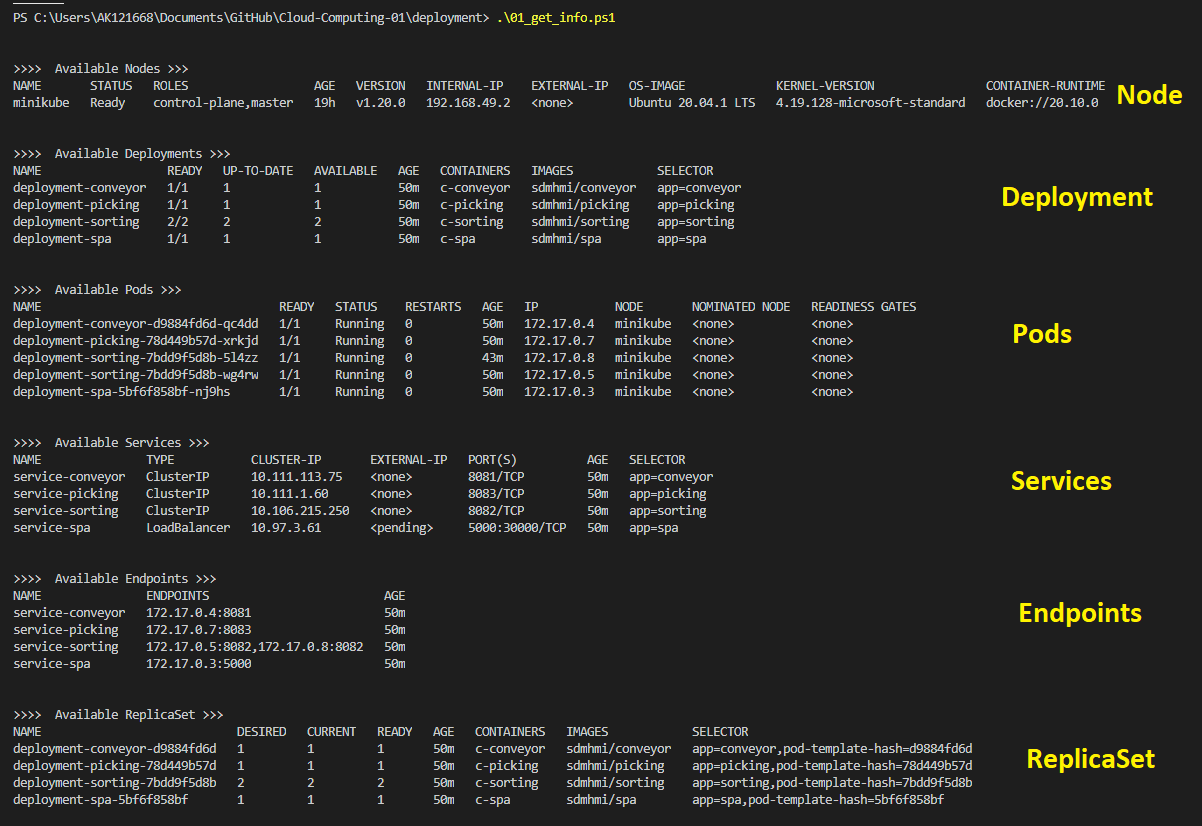
- Now we will do port-forwarding for HMI web server so that Dashboard can aggreegate them and show.
- forward-port for Conveyor HMI web server:
kubectl port-forward deployment/deployment-conveyor 8081:8081 --namespace="cc-ns" - forward-port for Sorting HMI web server:
kubectl port-forward deployment/deployment-sorting 8082:8082 --namespace="cc-ns" - forward-port for Picking HMI web server:
kubectl port-forward deployment/deployment-picking 8083:8083 --namespace="cc-ns"
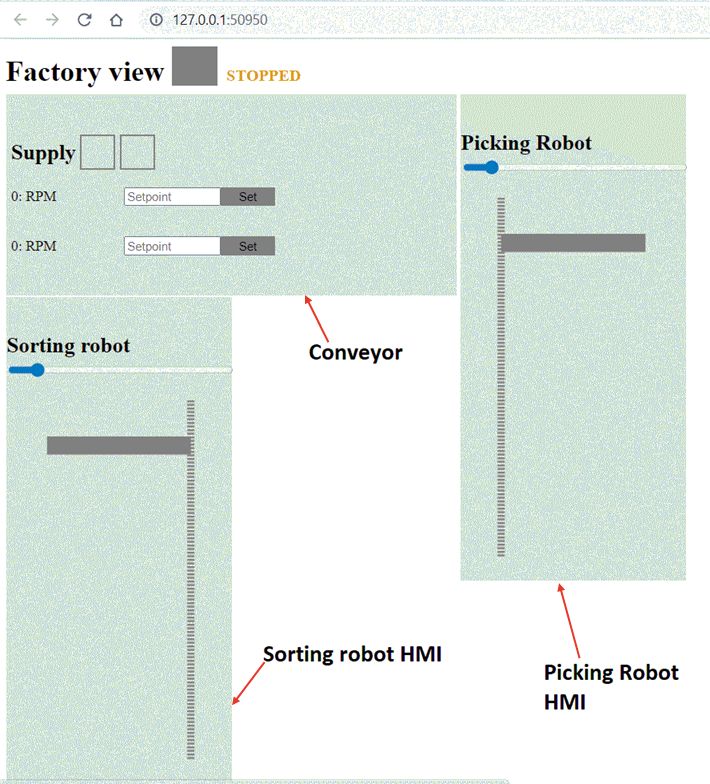
- Now we will start out dashboard service via console. It will automatically start page in browser.
minikube service service-spa -n cc-ns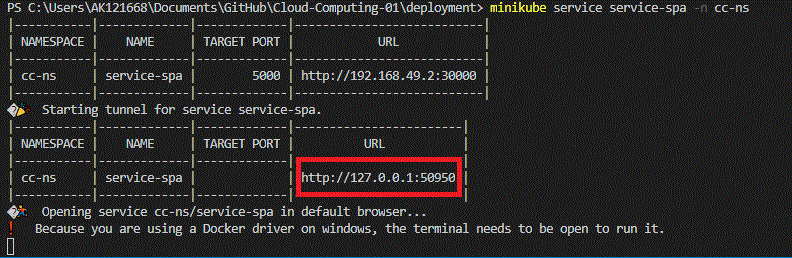
- Output in broswer
- Initially we wanted to have OPC UA Server and client communication between the PODS (Web based HMI) but somehow we could not able to make it run. We created the Docker images with OPC UA Client and Server but there were issues with certificates and connections.
- Woking on local machine for implemnetation was too much headache. PC were crashing a lot!
- Initially we tried with KinD but later switched with minkube. Because minikube have internal a command to call a POD with NodePort and somehow we could not make it run with KinD.
- We also wanted to use "Ingress" so that we can use alias as IP address but there were issue at the time of Installation of Ingress controller with "timeout".
- We were really amazed by the manual work of the "Port-Forwarding" and could not find a way to automate that --> This part was really annoying and took so much time to google.
Total 49 Hours
| S.No | Name | Hours |
|---|---|---|
| 1 | Proposal discussion | 3 |
| 2 | Proposal writing and update | 6 |
| 3 | Break down of Monolithic applications and converting them into images |
5 |
| 4 | Implementation in Kubernetes (Including Erros and crashes) |
15 |
| 5 | Learning and tutorial hands on | 20 |
| S.No | Name | Matrikulation Number |
|---|---|---|
| 1 | Virendra Ashiwal | k11926096 |
| 2 | Muddasir Shakil | k11923726 |
| 3 | Bahman Bahman-Zangi | K1528809 |