


Self‑hosted Docker stack (API + Admin Dashboard + embeddable widget) that streams chat responses via the OpenAI Responses API. Designed for a single bot per deployment (one customer/website per stack).
It supports OpenAI Agentic Builder workflow exports (SDK): paste the exported JS/TS into the dashboard and the server will compile and run it. If no workflow is enabled, the API falls back to direct Responses API calls with model + instructions (+ optional File Search via vector store IDs).
- Self‑hosted: API key stays server‑side; widget is just static assets.
- Agentic Builder (Workflow SDK) + automatic fallback to direct Responses API.
- Streaming (SSE) from API → widget.
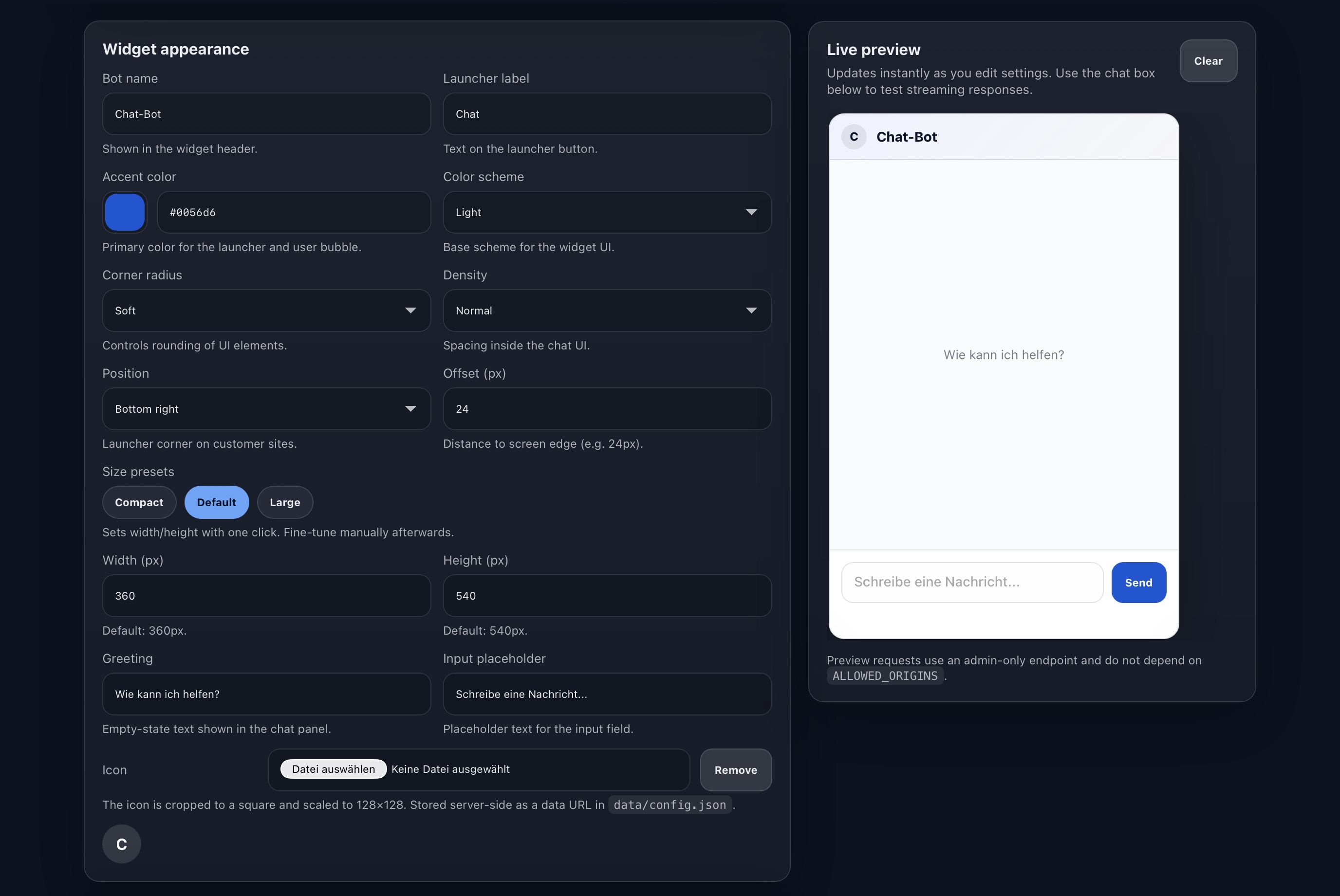
- Admin Dashboard to configure model/workflow, origins, and widget branding.
- Origin allow‑list + simple per‑IP rate limiting.
- No ChatKit dependency.
This project does not use ChatKit. It is fully self‑hosted and ships a small widget script you serve yourself. That usually plays nicer with CSP, corporate firewalls, and ad blockers, and avoids third‑party widget loaders.
- No cookies / tracking pixels by default.
- The widget stores chat history in
localStorageby default (client‑side only).
- API / Gateway
POST /api/chat/streamstreams responses (Workflow SDK or direct Responses API).- Stores config in
data/config.json(bind mounted). - Enforces
ALLOWED_ORIGINS+ rate limit.
- Admin Dashboard
- Configure OpenAI key, workflow/model, vector stores, allowed origins, UI/branding.
- Generates the embed snippet.
- Widget Host
- Serves
widget.js(and static assets). - Fetches
/api/config/publicand streams chat via/api/chat/stream.
- Serves
cp .env.example .env
# Set at least: ADMIN_TOKEN, PUBLIC_WIDGET_ORIGIN, API_BASE_URL
# Optional: cp docker-compose.override.yml.example docker-compose.override.yml

docker compose up -d --build- Dashboard:
http://localhost:3000(admin token:ADMIN_TOKEN) - Widget script:
http://localhost:8081/widget.js - API health:
http://localhost:8080/healthz
This repository can publish Docker images to GitHub Container Registry (GHCR):
ghcr.io/<owner>/<repo>/apighcr.io/<owner>/<repo>/widgetghcr.io/<owner>/<repo>/dashboard
Run without building locally:
cp .env.example .env
GHCR_REPO=OWNER/REPO IMAGE_TAG=latest docker compose -f docker-compose.ghcr.yml up -dThis project uses SemVer. To publish a new version:
- Update
VERSIONandCHANGELOG.md. - Create and push a git tag, e.g.
v1.0.0.
The GHCR workflow will publish images tagged like 1.0.0, 1.0, 1 (and also v1.0.0), plus latest on the default branch.
- Build a workflow in the OpenAI Agentic Builder.
- Export the workflow code (JS/TS).
- Paste it into the Admin Dashboard under Workflow SDK.
- Click Save Workflow.
The server expects an export like:
export const runWorkflow = async (workflow) => {
  // ...
};
The code runs server‑side. The widget never receives your API key.
If the workflow is empty/disabled, the API will call the Responses API directly using:
model(e.g.gpt-4.1-mini)- optional
instructions - optional
vector_store_idsfor File Search
<script src="https://YOUR-WIDGET-HOST/widget.js" data-api="https://YOUR-API-HOST"></script>data-api can include a path (e.g. https://api.example.com/customer-1) if you run multiple stacks behind one host.
In React/Next.js, <script> tags in JSX won’t execute automatically. Load the widget via useEffect:
"use client";

import { useEffect } from "react";

export default function ChatWidget() {
  useEffect(() => {
    if (document.getElementById("chatwidget-loader")) return;
    const script = document.createElement("script");
    script.id = "chatwidget-loader";
    script.src = "https://YOUR-WIDGET-HOST/widget.js";
    script.async = true;
    script.dataset.api = "https://YOUR-API-HOST";
    document.body.appendChild(script);
  }, []);

  return null;
}The dashboard persists configuration to data/config.json (and workflow code to data/workflow.source.ts).
Make sure data/ is mounted as a persistent volume.
ADMIN_TOKEN(protects/api/configand/api/workflow)PUBLIC_WIDGET_ORIGIN(used to generate the embed snippet in the dashboard)API_BASE_URL(used to generate the embed snippet in the dashboard)
DATA_DIR(default:./data) host directory mounted to/app/dataALLOWED_ORIGINS(comma‑separated or newline‑separated)RATE_LIMIT_PER_MINUTE,BASE_PATH,ALLOW_NO_ORIGIN,OPENAI_BASE_URL- Defaults used only when
config.jsonis empty:OPENAI_API_KEY,OPENAI_MODEL,OPENAI_INSTRUCTIONS,VECTOR_STORE_IDS,OPENAI_TEMPERATURE,OPENAI_MAX_OUTPUT_TOKENS,OPENAI_BETA,OPENAI_REQUEST_OVERRIDES
See .env.example for a full list.
- Keep your
ADMIN_TOKENlong and random. - Only add customer website origins to
ALLOWED_ORIGINS. - The OpenAI API key is stored server‑side in
data/config.jsonand never shipped to the widget.
Option A: subdomain per stack
api-customer1.example.comwidget-customer1.example.com
Option B: one host, path per customer
https://api.example.com/customer-1https://widget.example.com/customer-1
If your reverse proxy does not rewrite paths, set BASE_PATH=/customer-1 in the API container.
MIT — see LICENSE.