Manual
This manual provides an introduction and a tutorial of the "qurious augment auto-fill" functionality in GameCat Armorset Builder.
Most of the armorset builders for Monster Hunter Rise: Sunbreak now allow players to import and save existing qurious crafted armors, and then include these qurious armors during the armorset search.
However, players often face the question of "which armors, and how to augment them, to get the desired skill set", instead of the question of "how to use my already-augmented armors". This cannot be solved by traditional armorset builders. It motivates us to develop an armorset builder that recommends practical qurious augment solutions that provide the desired skills. This will be a great guidance for qurious crafting and helps explore the limits of possible skill sets.
Meanwhile, the mechanism of qurious crafting leads to strong randomness. If a build given by an armorset builder requires extreme augments, its applicability will be very limited, especially for Switch players and PC players who do not use certain MODs. Although an augment might be transferable across armors, players still need a crafting strategy that can be completed in a reasonable amount of time, in other words, with reasonable "grindicity".
In conclusion, the armorset builder needs to recommend practical qurious augment strategies that both provide the desired skills and can be completed in game with a reasonable grindicity.
First, just like before any regular armorset searches, you need to specify the desired skills, edit the talisman list and qurious crafting list if you have any, and lock and/or exclude armors if needed. Then, click the drop-down box below in the searcher:
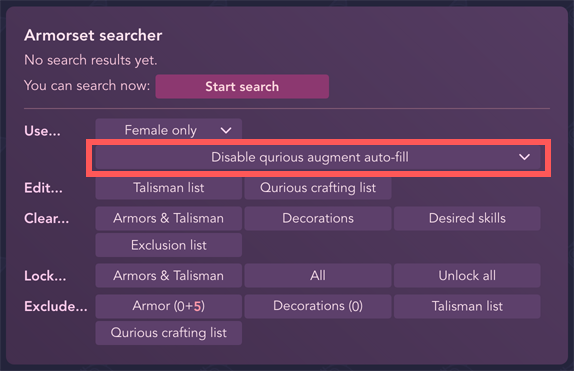
You will see the following options:
- Disable qurious augment auto-fill: the searcher will not recommend any qurious augment solutions.
- Fill qurious augments: skill/slot w/ prob ≥ p%: the searcher will use the simple augment filling algorithm, which recommends either a slot augment or a skill augment for each armor.
- Fill qurious augments: slots w/ prob ≥ p% and skill set: the searcher will use the skill set filling algorithm, which recommends either a slot augment or a set of skill augments (and acquiring any of the skill augments in this set is fine) for each armor.
Note: your qurious crafting list that contains your already-augmented armors will be used by the search, no matter which option you choose. These options only control how you want to augment base armors.
With one of the options selected, you can click "Start search". For details, please read sections simple augment filling or skill set filling below.
This algorithm recommends either a slot augment or a specific skill augment for each armor.
With the simple augment filling algorithm, in search results, some armors will be displayed in pale red backgrounds. Each recommended qurious augment is labeled with "Crafting needed" as well as a probability:

This means the searcher recommends you to augment these armors, and the probabilities are the odds of rolling that recommended augment. A detailed explanation of the probabilities can be found in the section augment probability (English version of this part is coming soon).
Note: in the game you might get a "skill level -1" augment. You will need to judge whether that affects your desired skills.
If an armorset solution contains armors with "Crafting needed", the searcher will display a "grindicity" for that solution:

The larger the "grindicity" is, the harder you can successfully augment all armors with the recommended skills in this solution. The "grindicity" is approximately the average number of rolls needed for most players to augment all armors as recommended.
It is also possible that more than one armor need to be augmented in some solutions:

If you apply a solution containing armors labeled with "Crafting needed", these labels will also appear in the main UI.
If you have augmented one of the armors as recommended, you can easily save this augmented armor by clicking the recommended augment right to the "Crafting needed" label of this armor:
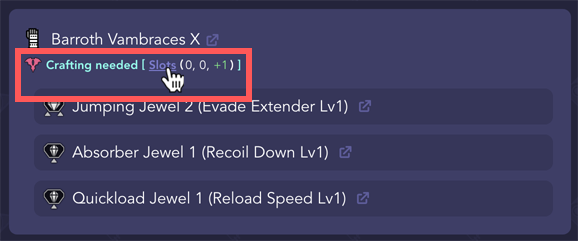
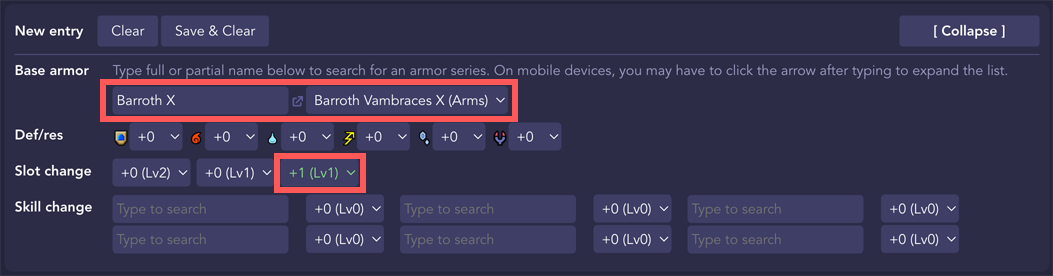
And you will be directed to the qurious crafting editor, with the specific base armor and augment already loaded, so that you can easily edit and save this augmented armor:
This algorithm recommends either a slot augment or a set of skill augments (and acquiring any of the skill augments in this set is fine) for each armor.
When you use the skill set filling algorithm, you will see search results like the following:

Here is what each circled number represents:
- An armor with a pale red background means that a slot augment is filled. The listed probability is the odds of this augment being rolled. More details about how this probability is calculated can be found in the section augment probability.
- "Skill sets to craft" label means that the algorithm found a set of skill augments, and you need to incrementally craft them on a series of armors. The search result is no longer a completed build, but a qurious crafting strategy.
- An armor with "Craft one among" label and light blue background means that the algorithm suggests you craft this specific armor first. Please keep reading to learn more about how to interpret the suggested crafting strategy.
- An armor with "Skill set TBD" label and dark blue background means that this armor also needs qurious crafting, but you should wait until the armor with label ③ is successfully augmented.
- "Grindicity" measures the overall difficulty of this qurious crafting series. It approximates the average number of rolls required to complete the entire crafting procedure for most players.
You can expand the search result by clicking on the empty space in the row:
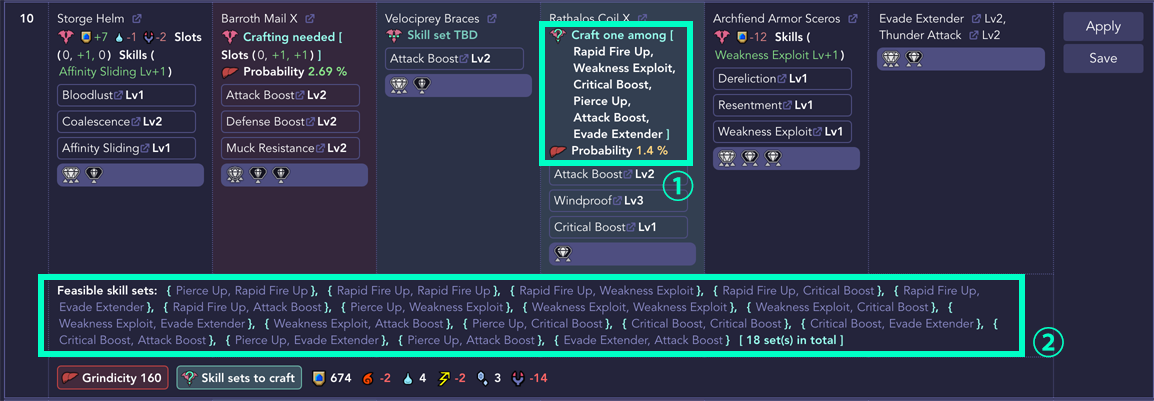
Here is what each circled number represents:
- "Craft one among" section will expand to show what skill to augment this armor with. Please keep reading to learn what you should do next.
- The search result will display a "Feasible skill set", including a list of skill combinations. Qurious crafting is completed if any skill combination in this list can be covered by the augments from armors with "Craft one among" and "Skill set TBD" labels. Then the build becomes possible.
- This part is for reference only. In practice, you should still craft the armor with "Craft one among" label, and follow the procedures described below.
- If there are too many feasible skill sets, only a subset of them will be displayed.
There may also be some results without "Skill sets to craft" label:

This means that the searcher did not have to search feasible skill sets on these builds. What is displayed is already a complete build. All you have to do is to augment those armors with the "Crafting needed" label. You can refer to the previous section simple augment filling.
Now let's go back to the search result with "Skill sets to craft" label. If you want to craft and build your armorset following this strategy, first click the "Apply" button on the right of this row, which takes you back to the main UI. Now, you can see an armor with "Craft one among" followed by a sequence of skills, each of which is clickable:
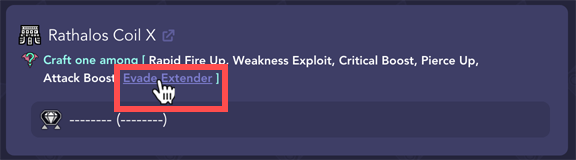
Please enter the game, qurious craft this armor, until one of the following conditions is met:
- You have rolled one of the listed skills.
-
You have rolled a slot augment, and you think this slot augment might be superior to one of the listed skills.
- Due to limitations of the algorithm, we have not taken into account a slot augment in this case, so your manual judgment is required. We will try to cover slot augments in future versions.
Afterwards, click on the skill you rolled (or any skill if you rolled a slot augment). This will open the qurious crafting editor, with the base armor and the skill info already loaded:
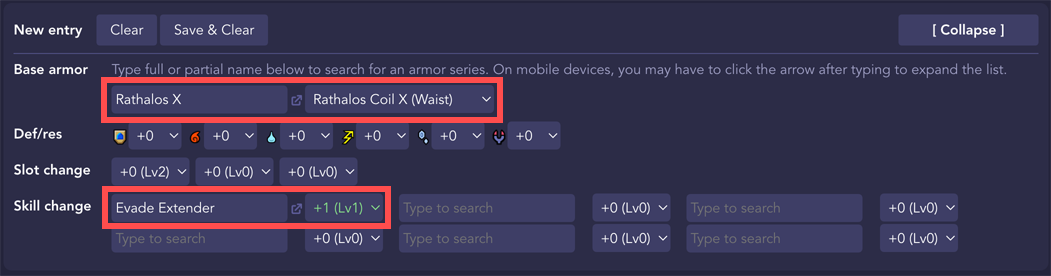
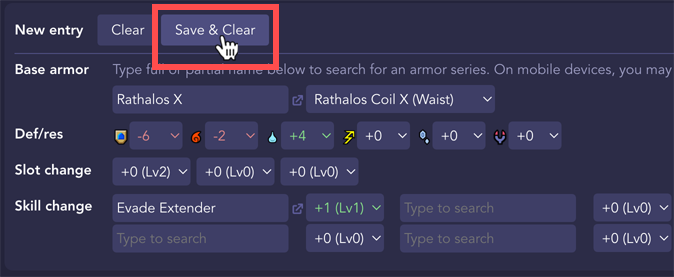
You need to edit the armor according to your in-game crafting result. After editing, click "Save & Clear" to save this armor (the values shown in this picture is just an example for illustration):
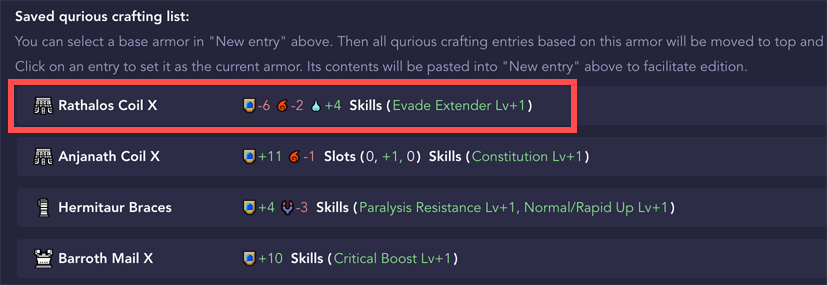
Make sure your armor shows up in the "Saved qurious crafting list" below:
Then close the qurious crafting editor, return to the main UI, and go to auto search mode. Now all armors and talisman are locked except for the ones with "Craft one among" or "Skill set TBD" labels:
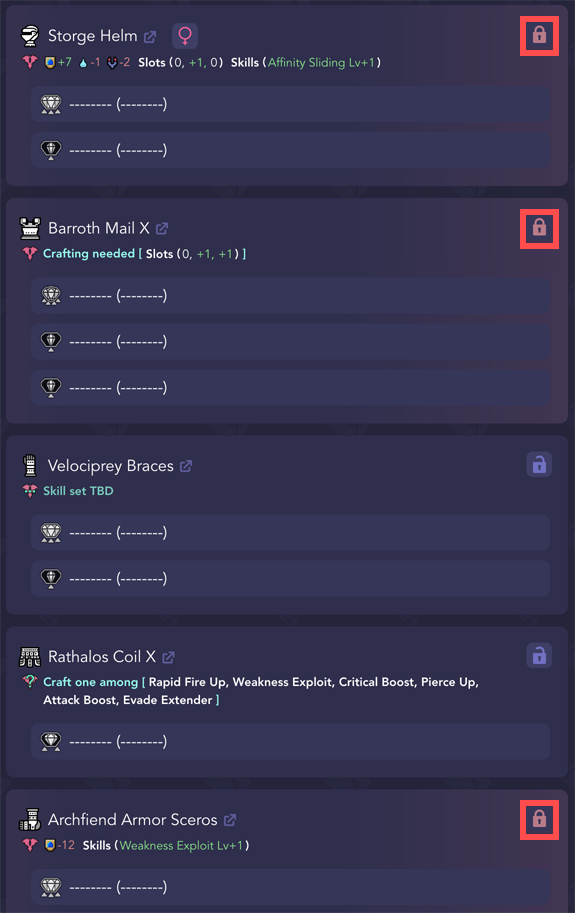
Now click "Start search" in the searcher panel. The searcher will apply the qurious crafting record you just saved, and will instruct you to craft the next armor:

Repeat this process until you go through all armors that need crafting. Now the algorithm will find a complete build:
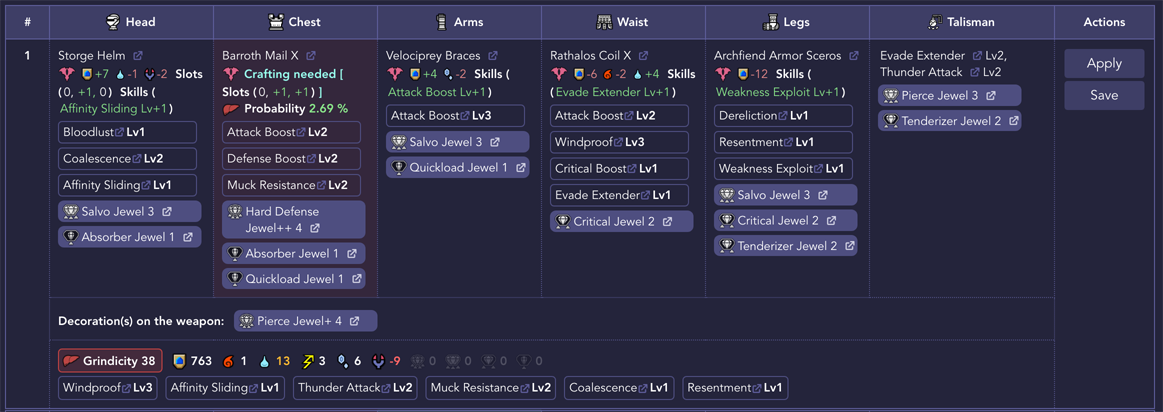
If you don't see the armor you just augmented appearing in the search results, possible reasons are:
- You have a slot augment, but this is useless for the build. You will need to continue augmenting that armor;
- Armorset build solutions with lower grindicity still exist even though other armors have been locked. You can see if solutions with higher grindicity contain the armor you just augmented.
- You have toggled on "Exclude…" → "Qurious crafting list". You can click that button to toggle off.
The mechanism of qurious augments has been researched quite thoroughly. You can refer to the following post:
- https://www.reddit.com/r/MonsterHunterMeta/comments/wmeth5/dtlnor_has_datamined_the_armour_augment_tables/qurious_armor_augments_datamine_is_available/ (English)
- https://bbs.nga.cn/read.php?tid=33109101 (Chinese)
Many thanks to @yohasakura (NGA), @dtlnor (bilibili), @少年A (bilibili) and other people who have made outstanding contributions to the research of qurious augments.
According to the mechanism described in the post from NGA, the simulation program can be written very simply (see qurious_entry_monte_carlo.py in this repo), using the Monte Carlo method to estimate the probability of different armors to produce different entries.
The program defines two parameters at the beginning:
N_MONTE_CARLO_LOOP = 100000000
FLAG_CONSIDER_DROP_SKILL = True
N_MONTE_CARLO_LOOP indicates the number of simulations for each type of armors; FLAG_CONSIDER_DROP_SKILL indicates whether to consider discarding skills. The specific meaning will be described in detail later.
When you actually run this program, you can get the following results (due to the nature of the Monte Carlo method, the results of multiple runs will be slightly different; the brackets are the actual number of times this situation occurs in 100 million attempts):
| COST | SKILL_1 | SKILL_2 | SKILL_3 | SKILL_4 | SKILL_5 | DECO_1 | DECO_2 | DECO_3 | DECO_4+ |
|---|---|---|---|---|---|---|---|---|---|
| 20 | 1.243759 % (39800295) | 0.866782 % (22536338) | 0.999733 % (17995196) | 0.802992 % (10438893) | 0.340077 % (4080920) | 13.707644 % (13707644) | 2.684949 % (2684949) | 0.270781 % (270781) | 0.007089 % (7089) |
| 18 | 1.231882 % (39420214) | 0.835835 % (21731710) | 0.795538 % (14319681) | 0.752421 % (9781476) | 0.309123 % (3709474) | 12.708012 % (12708012) | 2.042646 % (2042646) | 0.142092 % (142092) | 0.002445 % (2445) |
| 16 | 1.223912 % (39165186) | 0.820242 % (21326282) | 0.757684 % (13638315) | 0.538347 % (6998508) | 0.185999 % (2231990) | 11.908158 % (11908158) | 1.544080 % (1544080) | 0.066493 % (66493) | 0.000434 % (434) |
| 14 | 1.207911 % (38653154) | 0.789042 % (20515091) | 0.552670 % (9948057) | 0.501520 % (6519758) | 0.122849 % (1474187) | 10.680341 % (10680341) | 1.081348 % (1081348) | 0.036630 % (36630) | 0.000121 % (121) |
| 12 | 1.144973 % (36639142) | 0.640541 % (16654068) | 0.522543 % (9405782) | 0.218713 % (2843272) | 0.060634 % (727612) | 9.339404 % (9339404) | 0.729047 % (729047) | 0.020064 % (20064) | 0.000095 % (95) |
| 10 | 1.102174 % (35269581) | 0.620932 % (16144226) | 0.331125 % (5960250) | 0.201669 % (2621692) | 0.003356 % (40276) | 8.434648 % (8434648) | 0.486686 % (486686) | 0.009975 % (9975) | 0.000054 % (54) |
Note that:
-
The
COSTcolumn represents the initial budget of the armor. You can click here to check the correspondence between the armor and the initial budget (Note: currently, Ibushi and Narwa armors are not considered); -
The
SKILL_ncolumn indicates the probability of obtaining the entry "a certain type-n skill level +1" after qurious crafting the armor once. Skill types 1, 2, 3, 4, and 5 are correspond to skills in this document with cost 3, 6, 9, 12, 15; -
The
DECO_ncolumn indicates the probability of obtaining the entry "slot +n" after the armor is qurious crafted once;
There are three things worth noting here:
-
When calculating the above table,
CONSIDER_DROP_SKILLis set toTrue, which means that as long as the entry "skill level -1" is obtained, the armor will be regarded as useless and will not be counted. In practice, armor with the entry "skill level -1" does not necessarily lose effective skills, so the actual probability will be slightly higher than this table. However, even if the armor with the entry "skill level -1" is also included in the calculation, the increase in the probability is not obvious (for example, the probability of getting the entry "slot +1" for the armor with the initial cost of 20 has increased from the current 13.7% to about 18.0%). In future research, we will try to come up with a method to correct this part of the probability according to fit and armor. -
The probability of "a certain type-n skill level +1" refers to the probability of obtaining a specific skill, not the probability of obtaining any one of the skills. In the calculation, we assume that the skills are randomly selected in the table of the corresponding class.
-
In the above table, the two events of "a certain type-n skill level +1" and "slot +n" are not independent. Therefore, multiplying the two probabilities to estimate the probability of the two events occurring at the same time may introduce errors.
In the actual searcher, we use the following probability table:
| COST | SKILL_1 | SKILL_2 | SKILL_3 | SKILL_4 | SKILL_5 | DECO_1 | DECO_2 | DECO_3 |
|---|---|---|---|---|---|---|---|---|
| 20 | 1.243 % | 0.867 % | 1.000 % | 0.803 % | 0.340 % | 13.708 % | 2.685 % | 0.271 % |
| 18 | 1.232 % | 0.836 % | 0.796 % | 0.752 % | 0.309 % | 12.708 % | 2.043 % | 0.142 % |
| 16 | 1.224 % | 0.820 % | 0.758 % | 0.538 % | 0.186 % | 11.908 % | 1.544 % | 0.066 % |
| 14 | 1.208 % | 0.789 % | 0.553 % | 0.502 % | 0.123 % | 10.680 % | 1.081 % | 0.037 % |
| 12 | 1.145 % | 0.641 % | 0.523 % | 0.219 % | 0.061 % | 9.339 % | 0.729 % | 0.020 % |
| 10 | 1.102 % | 0.621 % | 0.331 % | 0.202 % | 0.003 % | 8.435 % | 0.487 % | 0.010 % |