Using search
All of the different search filters are logical AND operations, so for example Quality and Ethereal both independent filters
that both need to be satisfied for the item to match them.
This means there is no way to search for Magic OR Ethereal items. These would have to be conducted as separate searches.
The exception to the rule is filters that allow selecting multiple values, for example Item Tier allows selecting multiple values.
The different values within the same filter are logical ORs, which means that if you were to select Exceptional and Elite options, as well as Ethereal, the search would look for (Exceptional OR Elite) AND Ethereal items.
In the search results, you can sort items by some given stat by clicking on it, or clicking on items price, or listing age.
You can hold down Ctrl key down while hover over items descriptions to see a breakdown of the items stats, and where they come from:

Default value for a range includes all values, so Min: <blank>, Max: <blank> actually means Min: -Infinity, Max: +Infinity
Ranges for singular values, for example Strength required simply expect the value to fall within the given range,
so Min: <blank>, Max 154 would expect the Strength required value to fall between [-Infinity, 154] (inclusive at both ends).
Values that have a range (for example +10-20 Minimum damage), would expect the lower bound to be above the minimum, and upper bound to be below the maximum.
For example Min: 5, Max: 40 value filter for range +10-20 Minimum damage translates to 5 <= 10 AND 20 <= 40
This applies to to ALL ranges, except for stat group min/max counts that are explained below.
Note some stats are hybrid, for example All Resistances +# is actually 4 different stats, one for each resistance type, but all with the same value, hence the display gets grouped into All Resistances +#.
When searching for All Resistances +#, it looks for items where the value of all individual resistances are equal.
Namely an item like this:
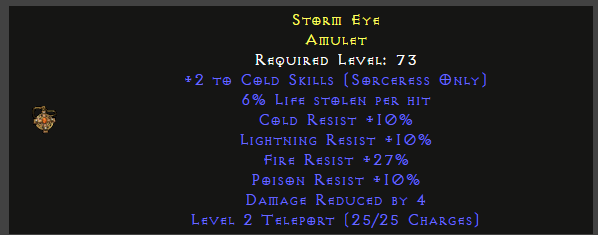
Which in theory is All Resistances +10 and Fire Resist +17%, would not pass All Resistances +X filter, as the stat values for each resistance are not equal.
You would search for these sort of items by filtering by each individual resistance separately:

When sorting by these hybrid stats, the sort only applies to one of the stats in the hybrid stat, so sorting by All Resistances +# will most likely filter by Lightning Resist +#%, so depending on your other filters, you might see unexpected results.
For example if I search for:
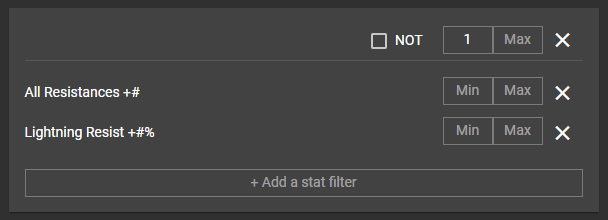
and sort by All Resistances +#, I would see the following sort order:

Where the middle item does not have All Resistances +#, but has the same stat as the hybrid stat consists of.
Stat groups are also ANDed between them.
By default, as seen here:
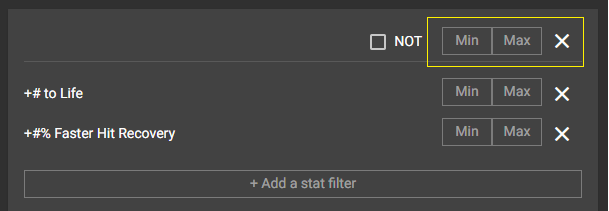
it will expect to find items that have both stats.
The Min/Max values on the header (rather than on the individual stats) controls how many of the stats
we expect to find from the group, which effectively means that all stats are logical ANDs.
Namely:
-
Min: 1, Max: <blank>- would match items which have atleast one of the two stats. -
Min: <blank>, Max: 1- would match items that only have one of the stats, i.e - exclude items that have both stats. -
Min: <blank>, Max: <blank>- equivalent toMin: 2, Max: 2in the scenario above. Note that this is different behaviour to value range filters, and only applies to counts for the stat group.
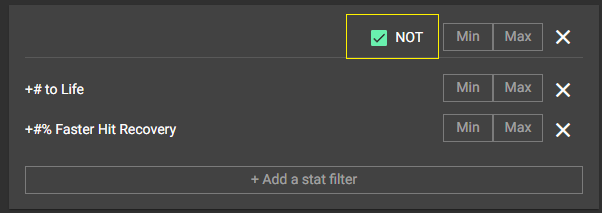
Similar logic applies for negation, namely the condition of the group is inverted.
So in the scenario above, it would exclude items that have ALL of the stats in the group.
You can also set Min: 1 which would exclude items that have ANY of the stats, or Min: 2 which would exclude items that have any 2 of the stats declared in the group.
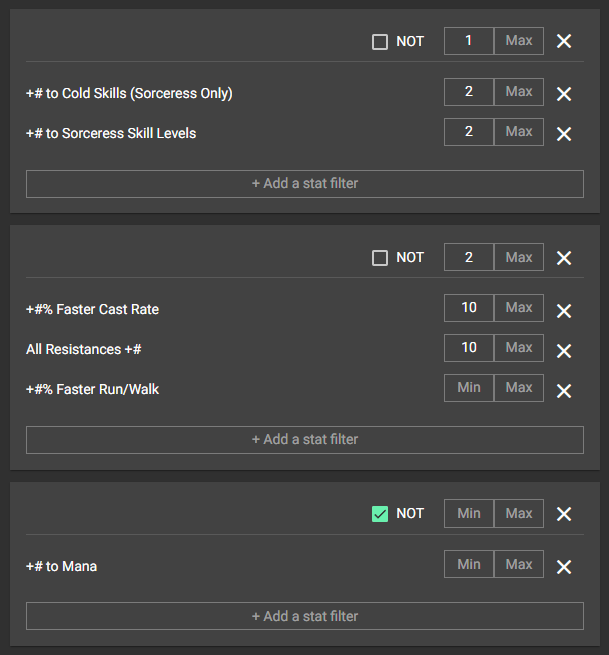
In this scenario we'd try to find items that have:
- Either of
2+ Cold sKillsor2+ Sorceress Skills - Two of
10+ FCR/10+ All res/Any Faster Run/Walk - Does not have
+ to Mana
All of the stat groups are logical AND operations.