A fast image viewer for photographers and power users — built with Python and Qt6.
RabbitViewer doesn’t just display images. It orchestrates them.
Rendering, metadata extraction, hashing, and file watching run in-process on background worker threads — no IPC overhead. A companion daemon continues indexing when the GUI is closed. The interface stays fluid — even when you point it at a massive RAW archive.
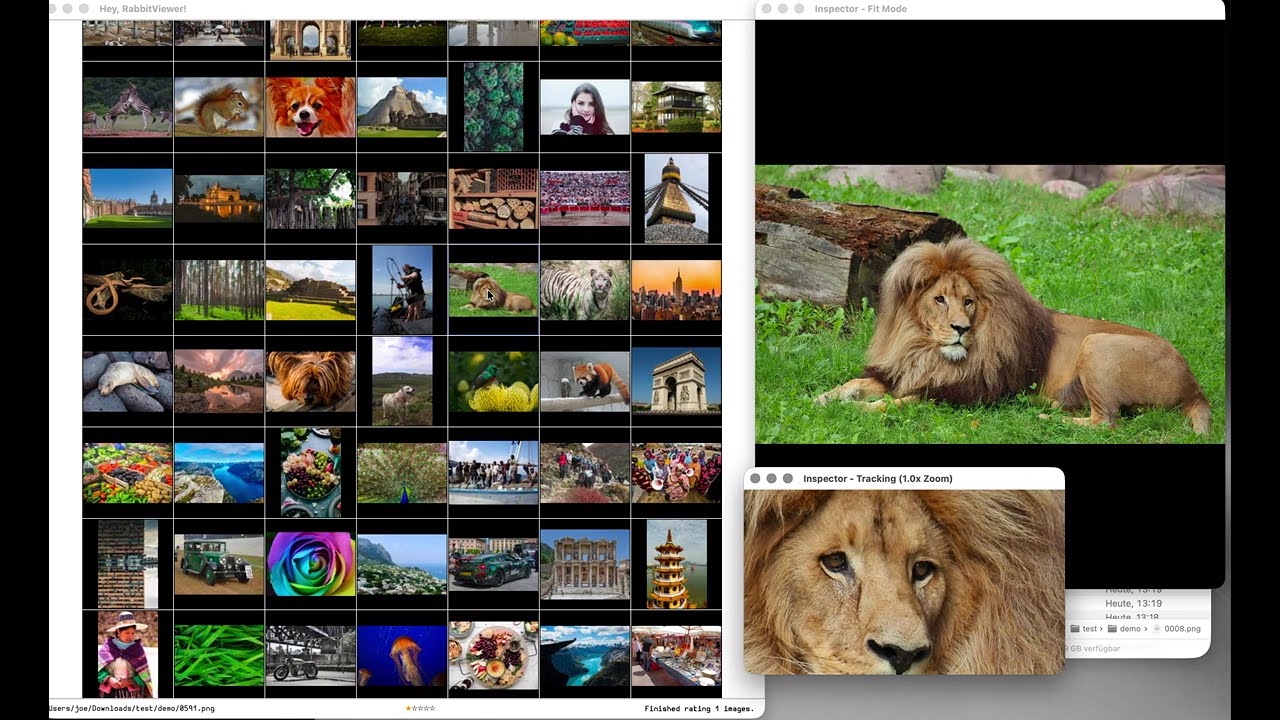
RabbitViewer keeps heavy work off the UI thread:
- Worker threads handle thumbnail generation, EXIF extraction, database writes, hashing, and file watching — all in-process.
- The GUI is dedicated purely to interaction and presentation.
- A background daemon (
rabbit --daemon) auto-launches when the GUI exits to keep indexing. When the GUI starts, the daemon detects it viaflockand pauses, yielding resources.
The result is predictable latency, smooth scrolling, and immediate feedback — even during large recursive scans or RAW-heavy workloads.
You can scroll aggressively through thousands of files and the interface never stalls.
Decoding, hashing, and metadata extraction never block the UI thread. The viewer remains interactive under load — always.
Images appear as soon as they’re decoded.
A heatmap radiates from the mouse cursor. Thumbnails closest to your pointer load first, decreasing outward across a 10-ring Manhattan diamond. Nearby images receive speculative full-resolution pre-caching within a 4-ring zone, with cooperative cancellation when you move.
The viewer anticipates you.
Ratings are:
- Written to XMP sidecar files (non-destructive — originals are never modified)
- Stored locally in SQLite
- Filterable instantly
No proprietary lock-in. Your metadata stays with your files in an open format.
Shutter speed, aperture, ISO, focal length, lens, camera body — immediately visible without leaving the viewer.
Add, move, or delete files — the library updates automatically.
No manual refresh. No rescans required.
Scan entire directory trees, or stay flat. Your workflow, your choice.
- Range selection
- Select all
- Invert selection
- Undo / redo
Designed for high-volume culling sessions.
Integrated mpv playback supports modern video formats. Scrub the timeline directly from the inspector using mouse position.
Switch seamlessly between stills and motion.
Assign free-form tags to any selection via the tag editor (T). Tags are written to XMP sidecars alongside ratings. Filter the grid by tag to narrow large sets instantly.
A floating info panel (I) shows structured metadata for the hovered or pinned image — EXIF, ratings, tags, and file details — in collapsible sections with configurable opacity.
Generate AI-edited variants of selected images using a local ComfyUI server (G). RabbitViewer dynamically builds form controls from any ComfyUI API workflow JSON. Ships with a built-in Flux Kontext workflow. Multi-image batches run in a background thread with cooperative cancellation.
- Smooth zoom
- Fluid panning
- Fast image switching
- Pixel-level inspector overlay (images and videos)
Zero friction between browsing and inspection.
Drop plain Python files into scripts/ and bind them to actions.
RabbitViewer exposes a clean API surface for automation. You can batch-edit ratings, reorganize selections, or implement custom workflows in minutes.
Extend format support by adding a file to plugins/.
Implement three functions:
get_thumbnail()
get_metadata()
set_rating()
Plugins are auto-discovered at startup.
RabbitViewer is designed to be extended — not forked.
- JPEG
- PNG
- BMP
- GIF
- TIFF
- WebP
- Canon CR2, CR3
- Nikon NEF / NRW
- Sony ARW / SR2 / SRF
- Fujifilm RAF
- Olympus ORF
- Panasonic RW2
- Pentax PEF
- Leica RWL
- Hasselblad 3FR / FFF
- Mamiya MEF / MOS
- Phase One IIQ / CAP / EIP
- Samsung SRW
- Adobe DNG
- MP4, MOV, MKV, AVI, WebM, M4V
- WMV, FLV, MPG, MPEG, 3GP, TS
New formats can be added through plugins.
Scripts are plain Python files placed inside scripts/.
Each script must expose:
def run_script(api, selected_images):Available API methods:
get_selected_images()get_all_images()get_hovered_image()set_selected_images()add_images()remove_images()set_rating_for_images(paths, rating)
Bundled scripts include:
- set_rating_0–4
- select_all
- invert_selection
- delete_selected
- sort_by_name
Automation is a first-class feature — not an afterthought.
- Python 3.10–3.13 (PySide6 does not yet support 3.14+)
- ExifTool (required for RAW support and writing ratings)
- ffmpeg / ffprobe (required for video thumbnails and metadata)
- mpv + libmpv (required for video playback)
macOS
brew install exiftool ffmpeg mpv
Debian / Ubuntu
sudo apt install libimage-exiftool-perl ffmpeg libmpv-dev
git clone https://github.com/Randalix/rabbitviewer.git
cd RabbitViewer
./install.sh
The install script:
- Creates a virtualenv using a compatible Python (3.10–3.13)
- Verifies dependencies
- Installs in editable mode
- Writes a
rabbitCLI wrapper into~/.local/bin/ - Sets up shell completion
- Installs a launcher entry
To update:
./install.sh
Clean reinstall:
./install.sh --clean
Optional extras:
venv/bin/pip install ".[cr3]"
venv/bin/pip install ".[video]"
From any directory:
rabbit /path/to/photos
Thumbnails appear progressively as files are processed.
Options:
rabbit /path/to/photos --no-recursive
Logs:
~/.rabbitviewer/rabbitviewer.log
The rabbit command also exposes standalone utilities:
rabbit --help
rabbit move-selected /dst
rabbit send-stop-signal
New subcommands are added by dropping .py files into cli/.
They are auto-discovered at startup.
The GUI runs all heavy work in-process via worker threads and a ThumbnailService facade — no sockets or serialization overhead.
A background daemon (main.py --daemon) is auto-launched when the GUI exits to continue indexing. When the GUI starts again, it acquires an flock; the daemon detects this and pauses, yielding resources until the GUI exits. The daemon can also be run standalone to pre-populate the cache.
The RenderManager uses a heatmap-driven priority queue:
- 10-ring Manhattan diamond around the cursor
- Priorities from 90 (under cursor) to 40 (outer ring)
- 4-ring speculative full-resolution pre-cache zone
- Cooperative cancellation
- Delta-only viewport updates
- Generation counters drop stale updates during fast scroll
- SourceJob discovers file paths
- Task factory converts paths into render tasks
- RenderTask supports cooperative cancellation via
threading.Event
SQLite (WAL mode) stores:
- Thumbnails
- EXIF metadata
- Ratings
- Content hashes
The thumbnail and view-image cache (~/.rabbitviewer/) is capped by max_cache_size_mb (default 10 GB, 0 = unlimited). When the limit is reached, background scans pause and the least-recently-accessed entries are evicted. Direct GUI requests still work — they trigger eviction reactively.
Based on watchdog. Startup delay avoids race conditions during large initial scans.
- PySide6 (Qt6)
- SQLite
- watchdog
- Pillow
- ExifTool
- ffmpeg / mpv
- ComfyUI (optional, for AI image generation)
pytest tests/
RabbitViewer is built for speed, determinism, and extensibility.
No blocking UI. No opaque automation. No hidden state.
Just a fast, inspectable system that scales from a small shoot to a multi-terabyte archive.