


MirrorFly Flutter Plugin is a custom real-time communication solution that adds 1000+ features including video, voice, chat, live streaming and activity feeds into any app. The solution is fully customizable and comprises over 500+ AI-powered features like AI voice agents, chatbots, speech-to-text API, AI contact centers and AI video KYC.
This custom plug-and-play solution helps build a white-label Flutter app in just 10 mins with full data control. Choose self-hosting, on-premise server or cloud deployment to host and maintain your Flutter app anywhere you prefer.
MirrorFly helps build omni-channel communication apps for any kind of business
💬 In-app Messaging - Connect users individually or as groups via instant messaging features.
🎯 HD Video Calling- Engage users over face-to-face conversations anytime, and from anywhere.
🦾 HQ Voice Calling - Deliver crystal clear audio calling experiences with latency as low as 3ms.
🤖 AI Voice Agent - Build custom AI voicebots that can understand, act and respond to user questions.
🤖 AI Chatbot - Deploy white-label AI chatbots that drive autonomous conversations across any web or mobile app.
🦾 Live Streaming - Broadcast video content to millions of viewers around the world, within your own enterprise app.
The requirements for Android
- Android Lollipop 5.0 (API Level 21) or above
- Java 8 or higher
- Gradle 4.1.0 or higher
- targetSdkVersion 34 or above
- compileSdk 34
The minimum requirements for iOS
- iOS 13.0
To obtain your license key, follow these steps:
- Sign up for a free MirrorFly account at MirrorFly Console. If you already have an account, simply sign in.
- Access your account: Navigate to the Overview page in your MirrorFly account to view your license key.
- Copy the license key from the Application Info section for use in the integration process.
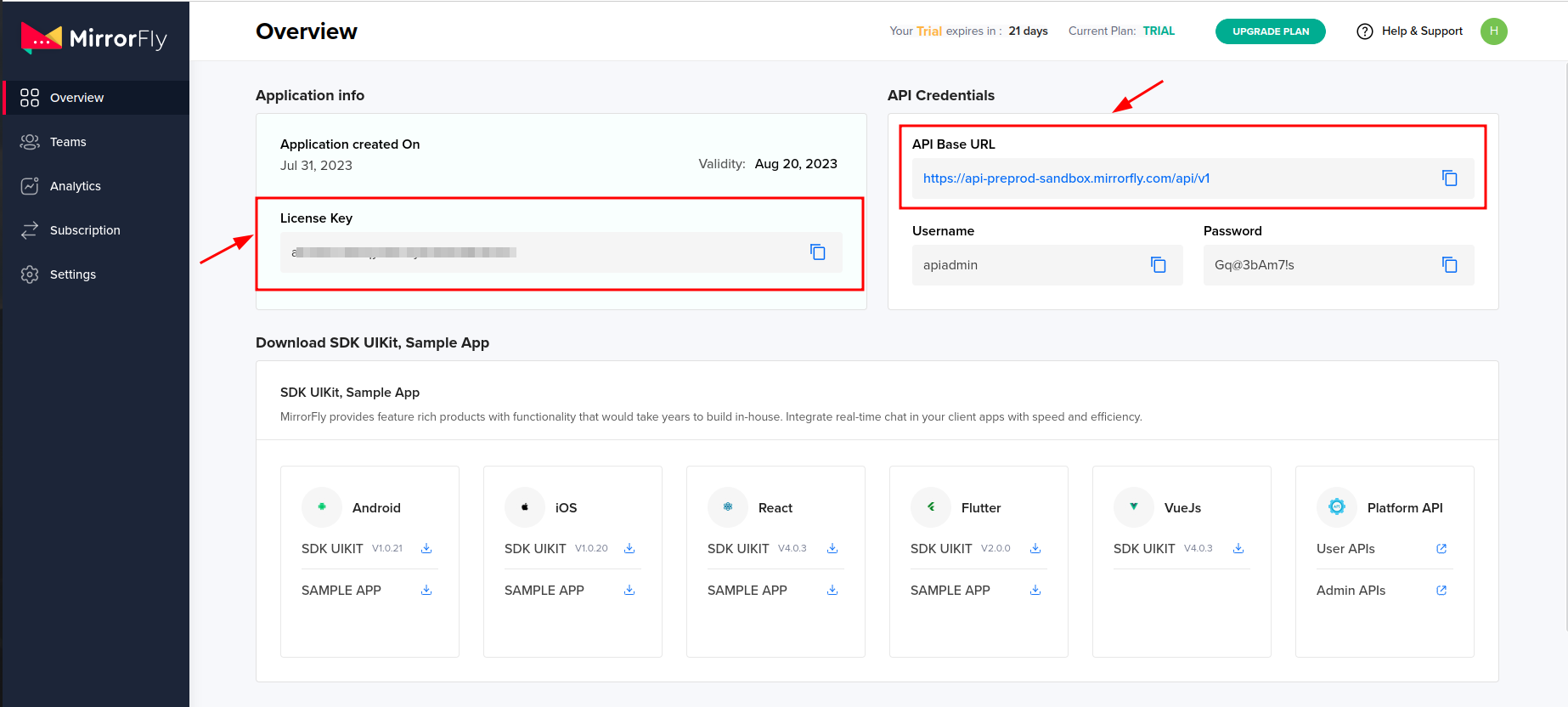
Add the following to your root build.gradle file in your Android folder.
allprojects {
  repositories {
    ...
    ...
    jcenter()
    maven {
      url "https://repo.mirrorfly.com/release"
    }
  }
}

android {
  compileSdk 34
  ...
  defaultConfig {
    ...
    minSdkVersion 21
    targetSdkVersion 34 // or higher
  }
}Check and Add the following code at end of your ios/Podfile
post_install do |installer|
  installer.aggregate_targets.each do |target|
    target.xcconfigs.each do |variant, xcconfig|
      xcconfig_path = target.client_root + target.xcconfig_relative_path(variant)
      IO.write(
        xcconfig_path,
        IO.read(xcconfig_path).gsub("DT_TOOLCHAIN_DIR", "TOOLCHAIN_DIR")
      )
    end
  end

  installer.pods_project.targets.each do |target|
    flutter_additional_ios_build_settings(target)
    target.build_configurations.each do |config|
      config.build_settings['IPHONEOS_DEPLOYMENT_TARGET']        = '12.1'
      config.build_settings['ENABLE_BITCODE']                     = 'NO'
      config.build_settings['APPLICATION_EXTENSION_API_ONLY']     = 'No'
      config.build_settings['BUILD_LIBRARY_FOR_DISTRIBUTION']     = 'YES'
      config.build_settings["EXCLUDED_ARCHS[sdk=iphonesimulator*]"] = 'arm64'

      shell_script_path = "Pods/Target Support Files/#{target.name}/#{target.name}-frameworks.sh"

      if File::exist?(shell_script_path)
        shell_script_input_lines  = File.readlines(shell_script_path)
        shell_script_output_lines = shell_script_input_lines.map { |line|
          line.sub(
            "source=\"$(readlink \"${source}\")\"",
            "source=\"$(readlink -f \"${source}\")\""
          )
        }

        File.open(shell_script_path, 'w') do |f|
          shell_script_output_lines.each do |line|
            f.write line
          end
        end
      end
    end
  end
end
Now, enable all the below mentioned capabilities into your project.
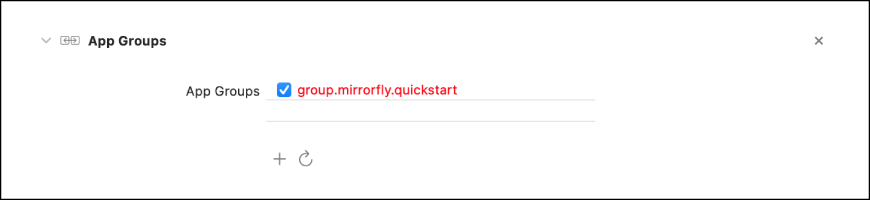
Goto Project -> Target -> Signing & Capabilities -> Click + at the top left corner -> Search for the capabilities belowAdd the below dependencies in pubspec.yaml.
dependencies:
  mirrorfly_plugin: ^1.5.0
Run the flutter pub get command in your project directory. You can then access all classes and methods using the following import statement.
import 'package:mirrorfly_plugin/mirrorfly.dart';To initialize the plugin, add the following code in your main.dart file inside the main function before calling runApp().
void main() {
  WidgetsFlutterBinding.ensureInitialized();
  Mirrorfly.initializeSDK(
    licenseKey: LICENSE_KEY,
    iOSContainerID: iOS_APP_GROUP_ID,
    chatHistoryEnable: ENABLE_CHAT_HISTORY,
    enableDebugLog: ENABLE_DEBUG_LOG, // to enable logs for debug
    flyCallback: (FlyResponse response) {
      runApp(const MyApp());
    },
  );
}Note: The Chat History feature lets you retrieve conversation history whenever you log in on a new device. Chat history is stored securely, ensuring users can access the same conversation threads across devices without any data loss.
Use the following method to log in a user in sandbox Live mode.
Important: Do not call the login method more than once in an application unless you have logged out the current session.
Note: During registration, this login method can optionally accept the FCM_TOKEN parameter. The connection will be established automatically upon registration completion, so a separate login is not required.
Mirrorfly.login(
  userIdentifier: userIdentifier,
  fcmToken: token,
  isForceRegister: isForceRegister,
  identifierMetaData: identifierMetaData,
  flyCallback: (FlyResponse response) {
    if (response.isSuccess && response.hasData) {
      // you will get the user registration response
      var userData = registerModelFromJson(value);
    }
  },
);Use the below method to send a text message to other user,
var textMessage = MessageParams.text(
  toJid: toJid,
  replyMessageId: replyMessageId, // Optional
  topicId: topicId,               // Optional
  textMessageParams: TextMessageParams(
    messageText: messageText,
  ),
);

Mirrorfly.sendMessage(
  messageParams: textMessage,
  flyCallback: (response) {
    if (response.isSuccess) {
      // message sent
    }
  },
);These listeners are triggered only when a new message is received from another user. For more details, refer to the callback listeners documentation.
Mirrorfly.onMessageReceived.listen((result) {
  // you will get the new messages
  var chatMessage = sendMessageModelFromJson(result);
});The Call feature is essential for modern communication. The Call SDK enables users to make one-to-one audio or video calls with another SDK user.
Note: Ensure all required permissions are granted before using the call feature.
For audio call, the below permissions:
Microphone PermissionFor video call, we need below permissions:
Microphone Permission
Camera PermissionTo make a one to one voice call, call the below method.
Mirrorfly.makeVoiceCall(
  toUserJid: USER_JID,
  flyCallBack: (FlyResponse response) {
    if (response.isSuccess) {
      // voice call initiated
    }
  },
);The Video Call feature allows users to make a one-to-one video call with another SDK user. Use the following method to initiate a video call.
Mirrorfly.makeVideoCall(
  toUserJid: USER_JID,
  flyCallBack: (FlyResponse response) {
    if (response.isSuccess) {
      // video call initiated
    }
  },
);
Make group voice call feature allows users to make a voice call with multiple users. You can make a group voice call using the below method.
Mirrorfly.makeGroupVoiceCall(
  groupJid: GROUP_JID,
  toUserJidList: USER_LIST,
  flyCallBack: (FlyResponse response) {
    if (response.isSuccess) {
      // group voice call initiated
    }
  },
);The Group Video Call feature allows users to initiate a video call with multiple participants. You can start a group video call using the following method.
Mirrorfly.makeGroupVideoCall(
  groupJid: GROUP_JID,
  toUserJidList: USER_LIST,
  flyCallBack: (FlyResponse response) {
    if (response.isSuccess) {
      // group video call initiated
    }
  },
);After a call is connected, you can add more users to the ongoing session. Use the following methods to invite users; once they accept the incoming call, they will join the ongoing call.
Mirrorfly.inviteUsersToOngoingCall(
  jidList: USER_LIST,
  flyCallback: (FlyResponse response) {
    if (response.isSuccess) {
      // users invited to ongoing call
    }
  },
);When you receive an audio or video call from another SDK user, the SDK reports the call, and the plugin displays an Incoming Call Notification.
When a call is presented with Accept and Reject buttons, you can either accept or reject it. If you accept the call, the onCallStatusUpdated event listener is triggered, and the call status will be set to Attended.
Mirrorfly.onCallStatusUpdated.listen((event) {
  var statusUpdateReceived = jsonDecode(event);
  var callMode   = statusUpdateReceived["callMode"].toString();
  var userJid    = statusUpdateReceived["userJid"].toString();
  var callType   = statusUpdateReceived["callType"].toString();
  var callStatus = statusUpdateReceived["callStatus"].toString();
});When making an audio or video call to another SDK user, you may need to disconnect the call either before the connection is established or after the conversation ends. Whenever the user presses the disconnect button in your call UI, call the following SDK method to disconnect the call and notify the other party.
Mirrorfly.disconnectCall(
  flyCallBack: (FlyResponse response) {
    if (response.isSuccess) {
      // call disconnected
    }
  },
);MirrorFly offers full freedom with the hosting options:
Self-hosted: Deploy your client on your own data centers, private cloud or third-party servers.
Check out our multi-tenant cloud hosting
Cloud: Host your client on MirrorFly’s multi-tenant cloud servers.
Check out our multi-tenant cloud hosting
MirrorFly offers a fully-built client SafeTalk that is available in:
- iOS
- Android
You can use this client as a messaging app, or customize, rebrand & white-label it as your chat client.
- Developer Documentation
- Product Tutorials
- MirrorFly Flutter Solution
- Dart Documentation
- Pubdev Documentation
- Npmjs Documentation
- On-premise Deployment
- See who's using MirrorFly
Need a tech team to build your enterprise app? Hire a full team of experts. From concept to launch, we handle every step of the development process. Get a high-quality, fully-built app ready to launch, carefully built by industry experts
If you’d like to take help when working with our solution, feel free to contact our experts who will be available to help you anytime of the day or night.
We're always on the lookout for talented developers, support specialists, and product managers. Visit our careers page to explore current opportunities.