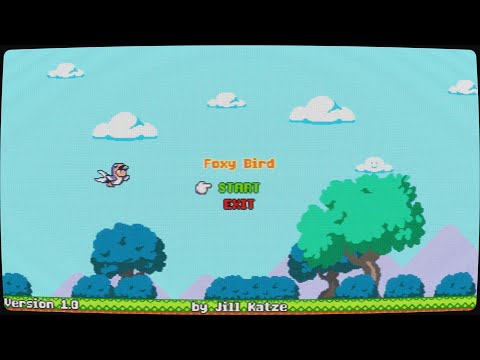
A minigame about flapping birds for the Kitsune Tails mod framework.
Now available on Steam Workshop!
From the official documentation:
Minigames should be installed in the AppData\Roaming\KitsuneTails\scripts folder on Windows, in $XDG_DATA_HOME/KitsuneTails/scripts on Linux, or (should you have hacked Kitsune Tails to work on Mac) in ~/Library/Application Support/KitsuneTails/scripts.

On Windows you can get to your AppData\Roaming folder by typing %APPDATA% in the navigation bar of file explorer and pressing enter. On Linux $XDG_DATA_HOME/KitsuneTails/scripts usually maps to the folder ~/.local/share/KitsuneTails/scripts.

Each minigame should have its own folder, named for the game, and within it must have at least a script.lua file containing the game’s code. There can be other files such as tilemaps, images, or anything else you might load using loadresource, but the main script file must be there for a minigame to work.
In other words, find the directory mentioned above for your system, then create a new folder in there called Foxy Bird and put this repository's script.lua in that new folder. If you don't want to deal with Git Stuff to get the file, just right-click and save this link: https://raw.githubusercontent.com/JillKatze/Foxy-Bird/main/script.lua
You could also just check this git repository out straight into your appropriate Kitsune Tails folder, but because the repository name has a hyphen instead of a space, it would show as "Foxy-Bird" in the menu since it shows the directory name there. The choice is yours!
Fixed a layering issue with the difficulty indicator during gameplay. It was originally intentional for it to go behind the pipes but because I last-minute decided to move the high score counter up top, it ended up being the only piece of UI up top that wasn't always on top which ended up bothering me about 1 second after I released 1.1.
- Reworked scoring system. Going through a single pipe is now worth a base 100 points due to the below changes.
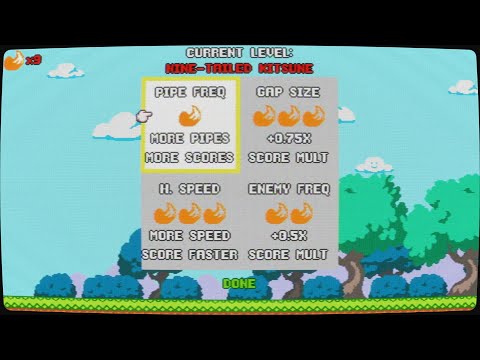
- Added "Tails Level" system
- Similar to heat levels from Hades, taking on a number of Tails increases the challenge along with your score.
- Some tail types effectively increase your pipes cleared per second, thereby making your score go up faster in exchange for more challenge.
- Other tail types increase the challenge in other ways, and therefore add to a score multiplier.
- Are you fox enough to challenge the Nine-Tailed Kitsune difficulty level?
Initial release. A simple Flappy Bird clone with no options or difficulty settings. Just you, some pipes, your jump button, and gravity.
I have some ideas for future improvements but this is fully functional and aesthetically up to my standards for a quick little single-day project so I'm going to go ahead and post it, but keep an eye out in case I decide to pick this up again and get weird with it. Or, feel free to do that yourself and show me if you want. Go wild.