If you find this useful, a ⭐ helps others discover it
No Terminal. No Docker. No Node.js. No npm.
Download. Install. Done.




Download · Documentation · Changelog
| Others | Skales | |
|---|---|---|
| Setup | Docker, Terminal, CLI | Download EXE/DMG/AppImage, double-click |
| RAM | 1.5-3GB+ | ~300MB |
| OS | Linux / Docker required | Windows + macOS + Linux native |
| Time to first agent | Hours to days | 30 seconds |
| Updates | Manual rebuild | One-click auto-updater |
📅 Planner AI - AI-powered daily scheduling. 8-step wizard learns your work patterns, generates time-blocked plans from your calendar events, and pushes them back. Day and week views.
📅 Calendar Abstraction - Google Calendar, Apple Calendar (CalDAV/iCloud), and Outlook (Microsoft Graph API). All three work simultaneously.
🚀 FTP/SFTP Deploy - Upload Lio AI projects to any FTP/SFTP server. Central profile management in Settings, per-project deploy config, incremental upload.
🧠 Proactive Desktop Buddy - Your buddy observes calendar, email, tasks, and idle time. Meeting in 5 minutes? Buddy reminds you. End of day? Buddy summarizes what you accomplished. Rule-based, no LLM calls, respects quiet hours.
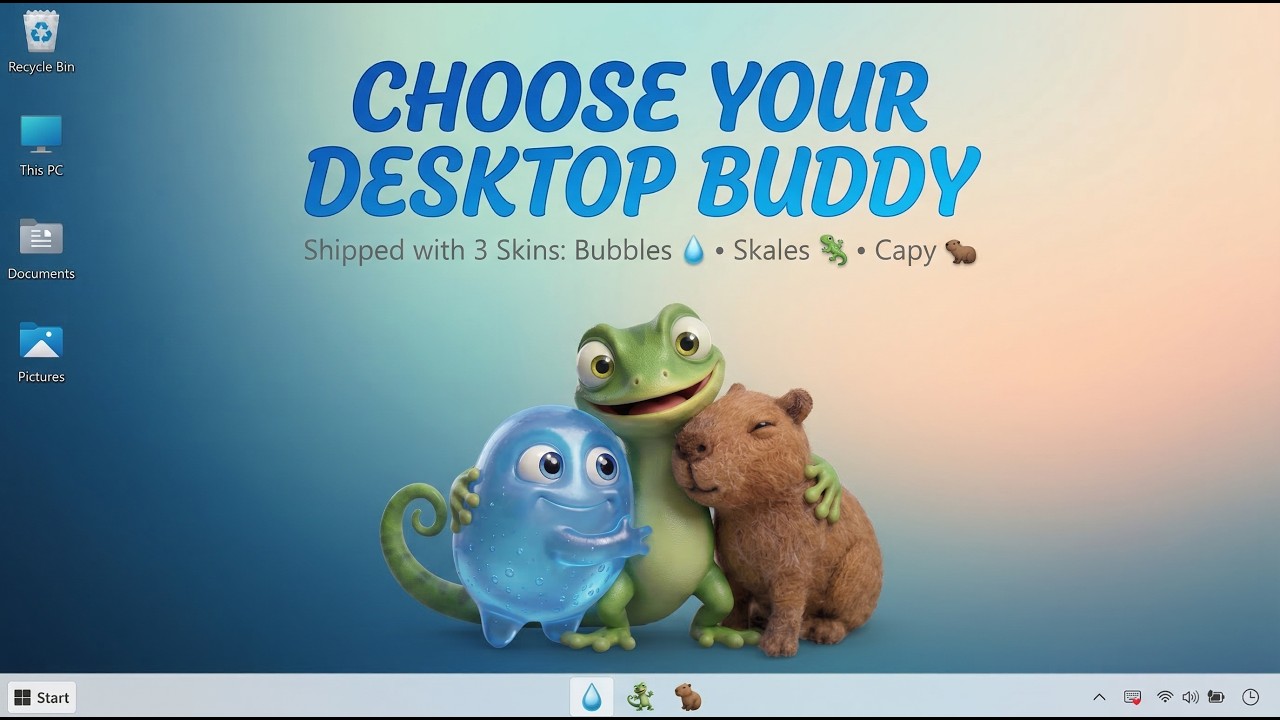
🦫 Capy Skin - Meet the third Desktop Buddy: a needle-felted capybara. Three skins, three aesthetics: Skales (3D gecko), Bubbles (Pixar blob), Capy (wool yarn capybara).
🌍 7 Languages - English, Deutsch, Espanol, Francais, Russian, Chinese (Simplified), Japanese. Full UI translation including onboarding.
🐧 Linux Beta - AppImage and .deb builds for x64 Linux. Community-tested on Ubuntu.
🔄 Model Auto-Fetch - Real-time model lists from OpenAI, Google, OpenRouter, Ollama APIs. No more hardcoded model IDs.
📨 Email Attachments - Send files via the send_email tool. Sandbox-validated paths.
📋 Morning Briefing - Daily digest of calendar events, pending tasks, unread emails.
📁 File Sandbox - Three modes: Unrestricted, Workspace Only, Custom Folders.
🎨 Redesigned Onboarding - 7-step wizard with Cloud/Local/Custom provider cards, Ollama auto-detect, model auto-fetch, buddy picker, safety mode selection.
⚙️ Settings Restructured - 7 tabs (All, General, AI Providers, Integrations, Notifications, Security, Advanced). Right-click context menu for copy/paste.
💰 Skales+ Tiers - Free Forever / Personal ($9/mo) / Business ($29/mo). All features free during beta.
🖥️ Native Desktop App - Runs as a proper desktop application. System tray, auto-start, graceful shutdown. No browser needed.
Multi-Provider Hub - 13+ LLM providers: OpenRouter, OpenAI, Groq, Anthropic, Google, Mistral, Together AI, xAI, DeepSeek, Minimax, Replicate (BYOK), Custom OpenAI-compatible endpoint (llama.cpp, LM Studio, vLLM, KoboldCpp), and local Ollama.
🦁 Lio AI - Code Builder - Multi-AI code builder. Architect designs, Reviewer improves, Builder executes. Live preview. Build entire projects from plain language. Deploy to FTP/SFTP with one click.
📅 Planner AI - AI-powered daily scheduling. Wizard learns your patterns. Generates plans. Day and week views. Push to Google/Apple/Outlook calendars.
🌐 Browser Control - Headless Chromium automation via Playwright. Navigate, click, fill forms, scrape, screenshot any website.
👁️ Vision & Screenshots - Desktop screenshot analysis, image recognition, vision-capable model fallback across all channels.
💬 Telegram & WhatsApp - Chat with Skales on the go. Full remote control via Telegram with admin menus.
📧 Email Integration - Read, compose, reply, search, manage emails with attachments. IMAP/SMTP with safety gates. Multi-account support with per-mailbox whitelists.
📅 Calendar Integration - Google Calendar (OAuth), Apple Calendar (CalDAV), Outlook (Microsoft Graph API). Read/write access, event reminders.
𝕏 Twitter/X Integration - Post tweets, read timeline, reply to mentions. OAuth 1.0a.
🛡️ Safety Mode - Two-level command safety: Safe (all actions require approval) and Unrestricted (full autonomy).
🧠 Bi-Temporal Memory - Auto-extracts facts and preferences from conversations. Injected as context before every reply.
👥 Group Chat - Multiple AI personas debate your questions in configurable rounds.
⚡ Autonomous Execute Mode - Multi-step task execution with approve/reject checkpoints.
🛑 Killswitch - Emergency stop via dashboard, Telegram, or automatic trigger.
🌍 Multilingual - Full UI in 7 languages: English, Deutsch, Espanol, Francais, Russian, Chinese, Japanese. Language picker on first launch.
🎨 Image & Video Generation - Google Imagen 3, Veo 3, Replicate SDXL, FLUX, and 50+ more models via your own Replicate API key.
🔌 Custom AI Endpoint - Connect any OpenAI-compatible local server (llama.cpp, LM Studio, vLLM, KoboldCpp). Tool-calling toggle. Configurable Vision + TTS URLs. Uncapped timeout.
👑 Skales+ - Coming soon. Free tier stays free forever. Join the waitlist from Settings.
🔍 Live Web Search - Real-time, cited search results via Tavily.
🗣️ Voice Chat - Full duplex voice interface. Speak to Skales and hear replies via ElevenLabs TTS or browser speech synthesis. Whisper (Groq / OpenAI) for transcription.
🔒 Security - Sandboxed file access (3 modes), command blacklist, domain blocklist, VirusTotal scanning.
⭐ Autopilot - Fully autonomous background agent. Deep-Dive Interview, Master Plan, OODA self-correction loop. Human-in-the-loop approval gates.
🧠 Skill AI - Custom Skills - Upload .skill.zip packages to add new capabilities. AI-generated skill scaffolding. Hot-reload without restart.
📄 Document Generation - Create Excel (.xlsx), Word (.docx), and PDF files from natural language.
🗺️ Google Places - Search nearby places, geocode addresses, get directions, fetch business details.
📺 DLNA Media Casting - Discover and cast media to smart TVs, speakers, and Chromecast on your network.
🌐 Network Scanner - Discover all devices on your LAN. Detects other Skales instances.
🚀 FTP/SFTP Deploy - Central server profile management. Deploy Lio AI projects with one click. Incremental upload.
🦎 Desktop Buddy - Animated mascot on your desktop. 3 skins: Skales (gecko), Bubbles (blob), Capy (capybara). Proactive intelligence: meeting reminders, email alerts, end-of-day summaries. Click to open spotlight input. Approve/Decline tools directly in the speech bubble.
🤝 Agent-to-Agent Protocol - /api/agent-sync endpoint for multi-Skales collaboration on the same network.
💾 Export / Import Backup - One-click ZIP backup of all settings, memories, and integrations.
| Platform | Download | Guide |
|---|---|---|
| Windows | Download for Windows | INSTALL-WINDOWS.md |
| macOS (Apple Silicon) | Download for macOS (M1-M4) | INSTALL-MAC.md |
| macOS (Intel) | Download for macOS (Intel) | INSTALL-MAC.md |
| Linux (Beta) | Download AppImage | See below |
- Download for your platform from skales.app
- Run the installer (EXE, DMG, or AppImage)
- Skales opens as a desktop app
- Follow the setup wizard - add your API key and start chatting
No Terminal. No Node.js. No Docker. No npm.
macOS users: After dragging Skales to Applications, run this once in Terminal to clear the Gatekeeper quarantine flag:
sudo xattr -rd com.apple.quarantine /Applications/Skales.appSee INSTALL-MAC.md for full details.
Windows users: If Windows SmartScreen shows a warning, click More info then Run anyway. See INSTALL-WINDOWS.md for details.
Linux users (Beta): Download the AppImage, make it executable (
chmod +x Skales-*.AppImage), and run. Or install the .deb package. Desktop Buddy behavior may vary across different desktop environments. Feedback welcome!
| Layer | Technology |
|---|---|
| Desktop Shell | Electron (main process, tray, auto-updater) |
| Frontend | Next.js 14 (App Router, standalone output) |
| Styling | Tailwind CSS |
| Language | TypeScript |
| Bots | Node.js (Telegram, WhatsApp, Discord) |
| Storage | ~/.skales-data (SQLite + JSON) |
| Updates | electron-updater (auto, silent) |
| Build | electron-builder (NSIS / DMG / AppImage / deb) |
Note: Pre-built installers are available at skales.app. Building from source is for contributors and developers.
- Node.js 20+
- npm 10+
- Windows (for
.exe), macOS (for.dmg), or macOS/Linux (for.AppImage/.deb)
# 1. Install dependencies
npm install --legacy-peer-deps
cd apps/web && npm install --legacy-peer-deps && cd ../..

# 2. Bundle bots
npm run bundle:bots

# 3. Build the Next.js frontend
cd apps/web && npm run build && cd ../..

# 4. Build the Electron app
npm run build:win     # Windows EXE
npm run build:mac     # macOS DMG (Apple Silicon + Intel)
npm run build:linux   # Linux AppImage + deb
Output is in dist/.
Contributions are welcome for bug fixes and non-commercial improvements.
- Fork the repository:
https://github.com/skalesapp/skales - Create a feature branch:
git checkout -b fix/your-fix - Commit your changes:
git commit -m "fix: description" - Push and open a Pull Request
Please read the BSL-1.1 license before contributing. All contributions are subject to the same license terms.
- @btafoya - Linux support, first community contributor and Linux beta tester
- BYOK (Bring Your Own Key): API requests go directly from your machine to the provider. No middleman.
- Local-First Storage: All data stays on your machine in
~/.skales-data. - Offline Capable: With Ollama, Skales works entirely offline.
- Sandboxed Autonomy: File operations run in a configurable sandbox (Unrestricted / Workspace Only / Custom Folders).
Skales can browse the web, execute commands, and manage files on your behalf. Always review what you ask it to do.
Skales started in early 2025 as a bloated Laravel SaaS project. I scrapped it all and rebuilt it as a native desktop app - the result is a local-first AI companion that feels like a real product, not a developer tool.
I'm Mario Simic - 10+ years in Marketing & Design. I got tired of agents that require Terminal setups and Docker containers. So I built something better.
- Claude & Google Gemini - For powering the development workflow.
- OpenRouter - The best hub for accessing the world's greatest LLMs.
Business Source License 1.1 (BSL)
Free for personal & educational use. Commercial use requires a license: [email protected]
See COMMERCIAL-LICENSE.md for details.
Local AI Agent (Source Available) - v7.0.0 "The Foundation" is the latest release under BSL-1.1.