-
Notifications
You must be signed in to change notification settings - Fork 10
Expand file tree
/
Copy pathREADME.Rmd
More file actions
146 lines (114 loc) · 6.56 KB
/
README.Rmd
File metadata and controls
146 lines (114 loc) · 6.56 KB
1
2
3
4
5
6
7
8
9
10
11
12
13
14
15
16
17
18
19
20
21
22
23
24
25
26
27
28
29
30
31
32
33
34
35
36
37
38
39
40
41
42
43
44
45
46
47
48
49
50
51
52
53
54
55
56
57
58
59
60
61
62
63
64
65
66
67
68
69
70
71
72
73
74
75
76
77
78
79
80
81
82
83
84
85
86
87
88
89
90
91
92
93
94
95
96
97
98
99
100
101
102
103
104
105
106
107
108
109
110
111
112
113
114
115
116
117
118
119
120
121
122
123
124
125
126
127
128
129
130
131
132
133
134
135
136
137
138
139
140
141
142
143
144
145
146
---
output:
html_document:
keep_md: yes
packagedocs:
toc: false
navpills: |
<li><a href='docs.html'>Overview</a></li>
<li><a href='install.html'>Install</a></li>
<li><a href='tutorial.html'>Tutorial</a></li>
<li><a href='rd.html'>Help</a></li>
<li><a href='news.html'>News</a></li>
<li><a href='https://github.com/flow-r/flowr'>Github <i class='fa fa-github'></i></a></li>
---
<!--brand: |-
<a href="http://flow-r.github.io/flowr">
<img src='https://raw.githubusercontent.com/sahilseth/flowr/devel/vignettes/files/logo.png' alt='flowr icon' width='40px' height='40px' style='margin-top: -10px;'>
</a>
-->
<meta property="og:description" content="Easy, scalable big data pipelines using hpcc (high performance computing cluster)">
<meta property="og:title" content="flowr — Easy, scalable big data pipelines using hpcc">
<meta name="twitter:description" content="flowr - Easy, scalable big data pipelines using hpcc (high performance computing cluster)">
<meta name="twitter:title" content="flowr — Easy, scalable big data pipelines using hpcc (high performance computing cluster)">
[](https://travis-ci.org/sahilseth/flowr)
[](https://cran.r-project.org/package=flowr)
<!--[](http://codecov.io/github/sahilseth/flowr?branch=devel)-->

<!--

-->
## [ Streamlining Computing workflows](http://flow-r.github.io/flowr/)
**Latest documentation: [flow-r.github.io/flowr](http://flow-r.github.io/flowr/)**
Flowr framework allows you to design and implement complex pipelines, and
deploy them on your institution's computing cluster. This has been built
keeping in mind the needs of bioinformatics workflows. However, it is
easily extendable to any field where a series of steps (shell commands)
are to be executed in a (work)flow.
### Highlights
- No new **syntax or language**. Put all shell commands as a tsv file called [flow mat](http://flow-r.github.io/flowr/overview.html#flow_matrix).
- Define the [flow of steps](http://flow-r.github.io/flowr/overview.html#relationships) using a simple tsv file (serial, scatter, gather, burst...) called [flow def](http://flow-r.github.io/flowr/overview.html#flow_definition).
- Works on your laptop/server or cluster (/cloud).
- Supports **multiple cluster computing platforms** (torque, lsf, sge, slurm ...), cloud (star cluster) OR a local machine.
- One line installation (`install.packages("flowr")`)
- **Reproducible** and **transparent**, with cleanly structured execution logs
- **Track** and **re-run** flows
- **Lean** and **Portable**, with easy installation
- **Fine grain** control over resources (CPU, memory, walltime, etc.) of each step.
### Example
[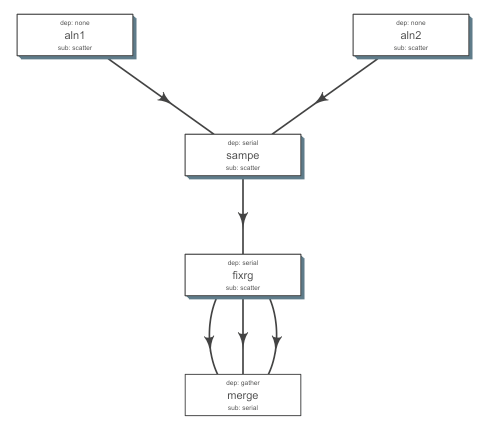](https://github.com/flow-r/fastq_bam)
<!---
- Example:
- A typical case in next-generation sequencing involves processing of tens of
[fastqs](http://en.wikipedia.org/wiki/FASTQ_format) for a sample,
[mapping](http://en.wikipedia.org/wiki/Sequence_alignment) them to a reference genome.
- Each step requires a range resources in terms of CPU, RAM etc.
- Consider step 1 uses 10 cores for each file; with 50 files it would use 500 cores in total.
- Next step uses one core for each file, 50 cores in total.
- Say step C merges them, and uses only 1 core.
- Some pipelines may reserve the maximum, example say 500 cores throught steps 1 to 3,
flowr would handle the **surge**, reserving 500, 50 or 1; when needed.
- Now consider the run has 10 samples, all of them would be procesed in
parallel, spawning **thousands of cores**.
--->
### A few lines, to get started
``` {r, eval=FALSE}
## Official stable release from CRAN (updated every other month)
## visit flow-r.github.io/flowr/install for more details
install.packages("flowr", repos = "http://cran.rstudio.com")
# or a latest version from DRAT, provide cran for dependencies
install.packages("flowr", repos = c(CRAN="http://cran.rstudio.com", DRAT="http://sahilseth.github.io/drat"))
library(flowr) ## load the library
setup() ## copy flowr bash script; and create a folder flowr under home.
# Run an example pipeline
# style 1: sleep_pipe() function creates system cmds
flowr run x=sleep_pipe platform=local execute=TRUE
# style 2: we start with a tsv of system cmds
# get example files
wget --no-check-certificate http://raw.githubusercontent.com/sahilseth/flowr/master/inst/pipelines/sleep_pipe.tsv
wget --no-check-certificate http://raw.githubusercontent.com/sahilseth/flowr/master/inst/pipelines/sleep_pipe.def
# submit to local machine
flowr to_flow x=sleep_pipe.tsv def=sleep_pipe.def platform=local execute=TRUE
# submit to local LSF cluster
flowr to_flow x=sleep_pipe.tsv def=sleep_pipe.def platform=lsf execute=TRUE
```
**Example pipelines** [inst/pipelines](https://github.com/flow-r/flowr/tree/master/inst/pipelines)
### Resources
- For a quick overview, you may browse through,
these [introductory slides](http://sahilseth.com/slides/flowrintro/).
- The [overview](http://flow-r.github.io/flowr/overview.html) provides additional details regarding
the ideas and concepts used in flowr
- We have a [tutorial](http://flow-r.github.io/flowr/tutorial.html) which can walk you through creating a
new pipeline
- Additionally, a subset of important functions are described in the [package reference](http://flow-r.github.io/flowr/rd.html)
page
- You may follow detailed instructions on [installing and configuring](http://flow-r.github.io/flowr/install.html)
- You can use flow creator: https://sseth.shinyapps.io/flow_creator), a shiny app to aid in
designing a *shiny* new flow. This provides a good example of the concepts
### Updates
This package is under active-development,
you may watch for changes using
the [watch link above](https://help.github.com/articles/watching-repositories/).
### Feedback
Please feel free to raise a [github issue](https://github.com/flow-r/flowr/issues) with questions and comments.
### Acknowledgements
- Jianhua Zhang
- Samir Amin
- Roger Moye
- Kadir Akdemir
- Ethan Mao
- Henry Song
- An excellent resource for writing your own R packages:
[r-pkgs.org](https://r-pkgs.org/)
<!--why this license http://kbroman.org/pkg_primer/pages/licenses.html -->
<script src = "vignettes/files/googl.js"></script>